2. Findings — Accessible digital government services for New Zealand
This section of the report explores information the research discovered.
The findings have been grouped into the following 8 themes:
- Practice and confidence in delivery
- Roles, responsibilities, and accountability
- Disabled people’s experience of government services
- The state of feedback processes
- Barriers to employment for disabled people due to inaccessible tools
- Gaps in skills, knowledge, and resources
- Systemic barriers to delivery
- Motivations and enablers for success
2.1 Current state of standards and practice within government
This section describes the current state of digital accessibility and service design across the New Zealand government. It represents the perspectives of government practitioners, subject matter experts, and external suppliers of products and services to government. It covers participants’ use of standards, how standards are embedded into work in practice, confidence in their organisation’s ability to deliver to standards, and the effects of accountability practices, leadership, and procurement processes on delivery.
2.1.1 Practice and confidence in delivery
Government practitioners and suppliers use a range of standards to inform their work, with government standards in particular used as a way to enable best practice. However, practitioners have a low confidence in their organisation’s ability to deliver accessible services.
Practitioners and suppliers struggle with measuring the performance of services, ensuring that accessibility and testing is embedded in delivery processes, and understanding the complexities of WCAG. Government practitioners report that suppliers often over-promise, while suppliers note that government clients can de-prioritise accessibility due to budget, timelines, or a lack of understanding of accessibility.
2.1.1.1 Awareness and usage of standards
Government practitioners use a range of standards in their work to meet government guidelines, and industry-aligned best practice
In a survey of practitioners across government, respondents were asked why they use standards for government digital services, with reasons highlighted as:
- Align with industry best practices (80%)
- Ensure accessibility and inclusivity (75%)
- Designing a high-quality service (68%)
- Users have a consistent experience across government services (57%)
- Meet contractual or policy obligations (52%)
- Save time and effort (36%)
- Improve collaboration and shared understanding (34%)
- Address knowledge gaps outside our specific expertise (30%)
- Help onboard new team members to a project or organisation (16%)
- Other (11%)
Only 20% said that they do not typically use standards in their work.
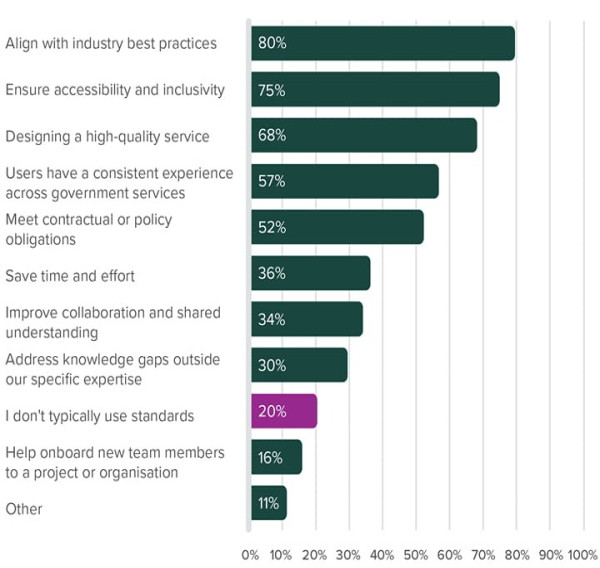
In workshops, participants gave a range of reasons why they use standards in their work including meeting mandatory government requirements, providing users with consistent and inclusive experiences across services, and managing risk — particularly with regard to security and privacy.
Participants in workshops highlighted a range of New Zealand and international standards that they use to support their work in both service design, accessibility, and other aspects of service delivery.
These included:
- Accessibility standards, including WCAG, EN 301 549, the New Zealand Government’s Web Accessibility and Web Usability Standards
- Data and statistical standards — both local standards like data.govt.nz’s standards for metadata, as well as international standards
- Privacy, information, and security standards and guidance, like the New Zealand Information Security Manual (NZISM)
- Other practitioner-facing design standards, including discipline-specific UX/UI design standards, as well as agency-based style guides and design systems
- The Digital Service Design Standard, as published on Digital.govt.nz.
There are key service design principles that practitioners find challenging, and are looking for additional resources on
In a survey of practitioners, respondents highlighted that there are certain service design principles that their organisation needs more support with.
Principles that were highlighted as needing support included:
- Measuring the performance of services (64%)
- Building for everyone equally from the start (61%)
- Resourcing for ongoing delivery (57%)
- Understanding users’ needs (52%)
- Making services simple to use (48%)
- Building cultural capacity (45%)
- Improve services often (43%)
- Define a clear purpose (41%)
- Select the right technology partners (39%)
- Support multi-disciplinary teams (39%)
- Share solutions (36%)
- Make services secure and trustworthy (23%)
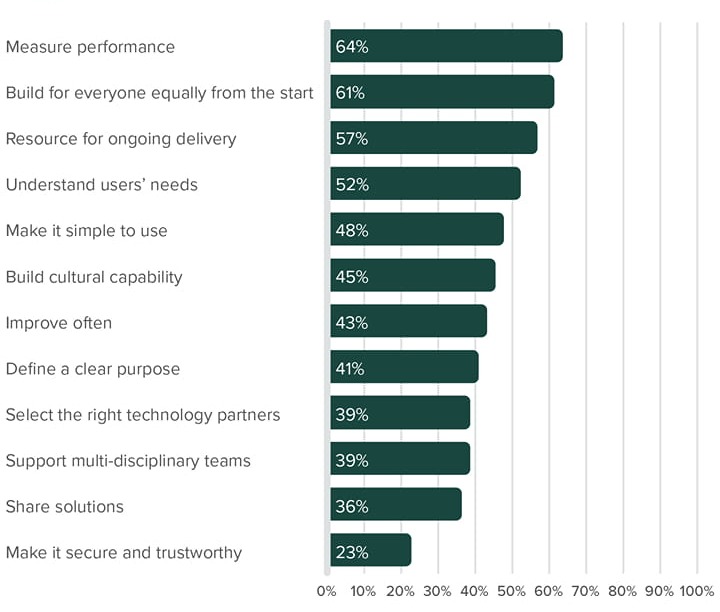
Respondents highlighted a key barrier as a poor understanding of service design and accessibility principles — particularly among leadership — which often leads to poor, unsuitable funding models to support services.
[We need] more practical advice for agencies on building internal service design capability, establishing communities of practice, and securing appropriate funding and leadership buy-in for service design initiatives. Agencies need the practical tools and support to implement standards effectively (i.e. case studies of successful cross-agency collaboration, templates for service design project proposals, guidance on integrating service design into existing project methodologies etc.).
My current organisation is playing catch up with digital products. My organisation's leadership don’t understand how digital standards and digital strategy impacts the entire ministry. They seem to think it's a technology change.
Practitioners are looking for specific guidance around data sovereignty, and its practical implications for service design
Practitioners in workshops highlighted a lack of explicit guidance around data sovereignty, how it should be planned for during the delivery of digital services, and what it means in practice for New Zealand-based government services.
One participant highlighted the Data Protection and Use Policy (DPUP), noting that it was useful, but that it was unclear if the policy was “mandatory or recommended”.
Other practitioners noted that they receive frequent questions around what the official government policy is on storing data offshore, and that although guidance existed, there was not a “standard” that they could point to.
Participants also noted that this was an area that was both highly technical and difficult for people to understand, but also connected strongly with concepts of Māori data sovereignty and the idea that “data is taonga”. Participants said that this made it a uniquely complex topic, and that they would benefit from more explicit guidance as part of the Digital Service Design Standard’s principles.
Suppliers are aware of WCAG, which is considered to be synonymous with the accessibility standard
Suppliers of government digital services were all aware of WCAG, and refer to the Web Accessibility Standard however none of the suppliers interviewed mentioned the Digital Services Design Standard. Web Accessibility Standard are considered to be synonymous with WCAG. All suppliers agreed that WCAG was difficult to understand, and used other mechanisms to help them interpret the requirements — including using Artificial Intelligence (AI), Google, and the Web Accessibility Guidance website. Suppliers had a range of confidence on how to apply the standards and WCAG to their work.
Some suppliers referred to using the Australian Standards, ADA (Americans with Disabilities Act), APCA (Accessible Perceptual Contrast Algorithm) for colour contrast, and a range of design systems to help broaden their understanding and interpretation of delivering accessible digital services, and to support delivery to their international clients.
Suppliers thought clearer guidance for content design in the standard would help improve the delivery of accessible content.
I always have to Google it, but I just use whatever the current WCAG guidelines are — AA standard.
I set up AI as a project buddy, so I can ask accessibility questions when working on a project by feeding into it all the guidelines.
2.1.1.2 How standards are embedded in practice
Less than half of practitioners say that accessibility is embedded in their organisation’s day-to-day practices
In a survey of government practitioners, 46% of respondents said that accessibility was not embedded in their organisation’s day-to-day practices, and 11% were unsure if it was.
When methods of embedding accessibility in day-to-day practice were in place, they included:
- Accessibility requirements included in project planning and delivery (36%)
- Accessibility included in job descriptions and/or performance expectations for relevant roles (34%)
- Dedicated accessibility specialists or expert roles (22%)
- A formal sign-off process that includes accessibility checks before services go live (22%)
- A formal accessibility policy or strategy (11%)
- Accessibility is part of employee onboarding or regular staff communications (11%)
- Unsure (11%)
- Other (5%)
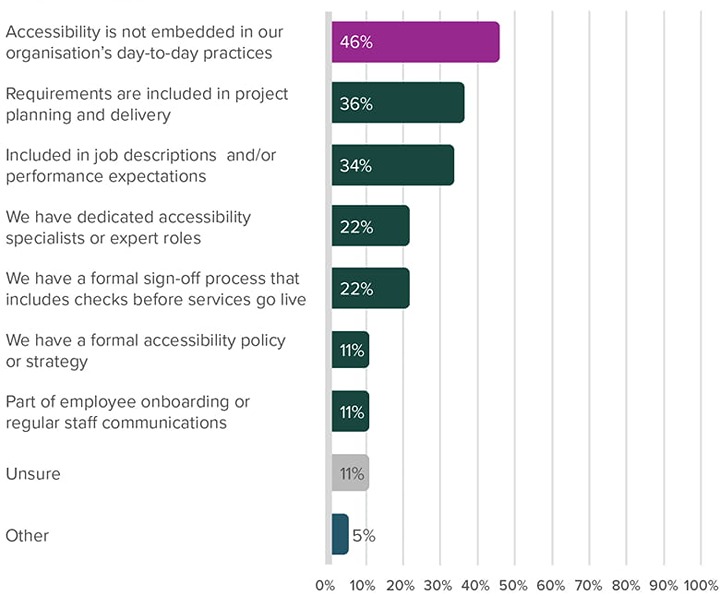
Only 11% of respondents said their organisation had a formal accessibility policy or strategy, or that accessibility awareness is part of employee onboarding or regular staff communications.
Just over half of practitioners say that their organisation tests and tracks their services for accessibility
Survey respondents said that their organisations test and track their services in some way.
In terms of testing for the accessibility of services during delivery, respondents highlighted methods that were used by their organisation:
- Manual testing against guidelines like WCAG (55%)
- Automated accessibility testing tools (55%)
- Testing with assistive technologies like screen readers (42%)
- Expert audits by internal or external specialists during the delivery process (36%)
- We do not have a formal testing process (26%)
- We primarily rely on vendors to ensure the accessibility of their work (24%)
- Direct user testing with disabled people (22%)
- Unsure (14%)
- Other (5%)
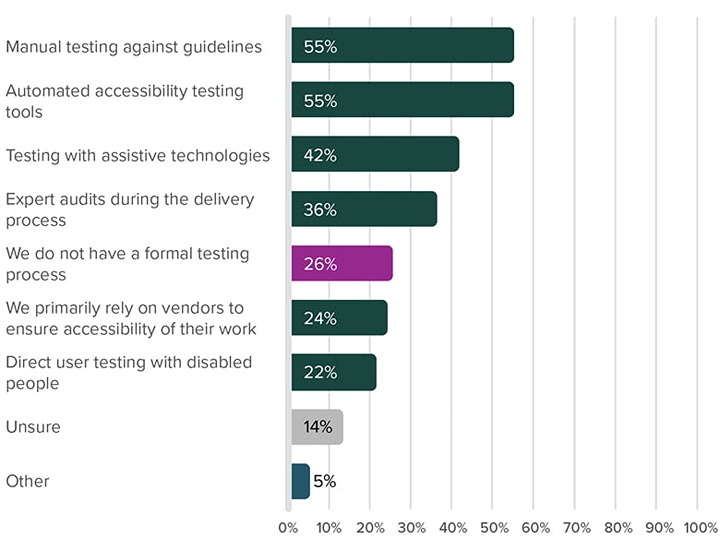
Notably, 26% of respondents said their organisation did not have a formal testing process, and only 22% of respondents said that their organisation did direct user testing with disabled people. This correlates with research carried out with disabled participants of this research.
Respondents also shared that practices for testing accessibility had generally declined, and that practices that were in place were not necessarily consistent across different services and teams.
I think that a range of these options have been used in the past, but I don't think that there is a standard process now, nor resources to do it.
We used to test very comprehensively, but restructure changes have removed this.
For tracking the accessibility of services, 36% of respondents said that their organisation did not formally track or manage accessibility, and 15% of respondents were “unsure”.
For those who do track accessibility, key methods include:
- Tracking accessibility issues in a bug/issue tracker (45%)
- Using checklists as part of design or development phases (34%)
- Expert audits of public-facing services by internal or external specialists (32%)
- Maintaining a public-facing acknowledgement of known accessibility issues and plans to address them, such as an accessibility statement (23%)
Similar to testing for accessibility, respondents emphasised that tracking accessibility was not necessarily consistent across teams or services, and that practices had become less common, rather than more.
Guidelines, standards, and tools support the delivery of accessible services
Both practitioners of service design and accessibility noted that access to New Zealand Government Web Standards, as well as resources and guidance available on digital.govt.nz, provide a crucial foundation of knowledge. These resources, along with internal design systems and templates, are used to support and advocate for accessible practices with decision makers.
Participants noted that having consistent advice and guidelines was useful in peer-based education, and that resources are much more freely available than they have been previously.
Suppliers have varying degrees of success embedding accessibility into their practice
During a project delivery process, the supplier design teams are typically given the responsibility of ensuring that designs are accessible and usable from both a human-centred perspective, as well as from an overall integrated user experience perspective. Accessibility tools built into Figma and colour checkers are used, and often a design system is used to support accessible design processes. In some cases, design systems may have become out-of-sync with actual product platforms.
Development teams focus on a more granular building of components, with responsibilities for accessibility typically on front-end developers rather than back-end developers.
Testing is often covered by testers carrying out Quality Assurance (QA) and — if possible — usability testing. Automated testing is performed by development teams using tools such as Axe, Lighthouse or their own in-house accessibility checkers.
All suppliers agreed it is best practice to embed accessibility into the process from the start, rather than trying to fix accessibility at the end of a project, however, not all suppliers were successful in being able to fully embed this into their processes.
For some suppliers, it is difficult to embed accessibility into their own practice if their own organisation is not already engaged with accessibility processes. Making a change in the way that organisations approach a project can face significant resistance, particularly if it means changing the way something has always been done.
[It depends on] who’s on your project at the time, or who you know, and you generally hope it passes around the office a bit, as opposed to having kind of a strict, strict way [of following accessibility processes].
Our front-end developers have cookie cutter best practice, standards and approaches for everything that touches accessibility.
Ideally, you start [embedding accessibility] from the beginning. It's embedded in the process from design right through to development.
2.1.1.3 Confidence of delivery
Practitioners have low confidence in their organisation to deliver accessible services
When asked about their confidence in their organisation to deliver accessible digital services, all practitioners within government stated that they had low-to-average confidence. The only outlier to this pattern came from a small organisation outside of government.
Some organisations have seen a decline in the accessibility of their services
Some practitioners and subject matter experts within government noted that they had seen a decline in practices that lead to accessible services, and this was apparent in the results of automated accessibility testing through services like DIA’s CWAC tool (Centralised Web Accessibility Checker).
I think we've actually regressed in the last couple of years — we used to have the capacity as well as the tools … we have the capability but not always the willingness to have shared accountability and ownership.
Delivering with suppliers is challenged by conflicting practices, priorities, and contractual and procurement agreements
A common theme across government practitioners’ experiences was that suppliers frequently over-promise on their capabilities, but fail to deliver — leading to a lack of confidence from government teams.
When accessibility problems are found in suppliers’ products, the cost of remediation can be prohibitively expensive, especially if not accounted for in the initial contract. This applies to both bespoke software, as well as 'off-the-shelf' products procured by government. In some cases, organisations have had to abandon a product and start again with a new supplier due to the high accessibility fix costs, or the inability to improve the accessibility of off-the-shelf products.
You often become beholden to a vendor — it’s not your IP, so if you want to make some kind of change for accessibility, it comes at a massive cost to you.
Organisations that manage multiple services are challenged by a range of skill levels to deliver accessible services
In organisations that manage a large number of diverse digital products and services, maintaining a consistent level of accessibility is a significant challenge. Skills and understanding can vary greatly from team to team, and some staff may not even be aware of their knowledge gaps.
Supplier commitments to the accessibility standard in proposals often fail to translate into consistent practice during project delivery
All suppliers of government digital services start projects by answering how they would deliver to standards noted in the Request for Proposal (RFP) documents. This often takes the form of a standardised question in RFPs, and suppliers often have a standardised answer which is used in their response. Suppliers noted varying levels of adherence to standards during the delivery process, with some suppliers not referring to it again, and others with thoroughly embedded accessibility processes.
Some suppliers said that it was difficult to understand what “meeting standards” actually meant, which was compounded by WCAG being complex and difficult to understand, and by inconsistent results in accessibility testing.
To test that they meet standards, most suppliers used a combination of automated and manual accessibility checks to test that a product has met standards. Due to various factors, requirements are not always met. Some supplier practitioners have a lack of confidence in their understanding of WCAG requirements, or are impacted by organisational processes, platform limitations, client preferences, and meeting budgetary and timeline requirements.
After the question in the RFP has been answered it's like ‘oh, cool, we’ve answered that, move on.’ You forget about it. Yeah, nobody really takes it seriously.
Because of the risk, we've changed our wording [in the RFP] to ‘adhere with’ [rather than ‘meet’].
Some suppliers said they would deliver their projects to meet the accessibility standard, regardless of their clients’ expectations or understanding of accessibility requirements. This was an approach that was already built into their practice processes.
All government projects have to meet it [accessibility standards], so we just do it anyway.
2.1.2 Roles, responsibilities, and accountability
Practitioners emphasise that accessibility is a shared responsibility across many different roles, however there is a critical gap in clear ownership and accountability. A lack of leadership buy-in was identified as the single biggest barrier to delivering accessible services, with leaders often expressing support for accessibility without providing the required resources or prioritisation to do so.
Though accessibility compliance is standard in contracts, procurement teams often lack the expertise to ascertain a supplier’s actual capability. This can lead to the procurement of inaccessible “off-the-shelf” products, and a situation where suppliers must balance contractual obligations against client decisions that compromise accessibility.
2.1.2.1 Accountability within government
Delivering accessible digital services is “everyone’s job”
In a survey targeting government practitioners, respondents noted that a range of roles all share responsibility in ensuring that services are accessible, and that most roles are in some way accountable for delivering accessible digital services.
Of the roles that were highlighted as being the most accountable, these included:
- Product owners and service managers (51%)
- Content designers and writers (50%)
- UX and UI Designers (46%)
- Developers and engineers (41%)
- Senior leadership and general management (32%)
One respondent highlighted that different groups are responsible or accountable at different levels.
While dedicated accessibility specialists are responsible for the day-to-day audits and working with others, it is the senior leadership and product owners who are accountable.
In workshops, some participants noted that a key barrier to the delivery of accessible digital services was an attitude from people working within government that accessibility “wasn’t their job”.
About two thirds of practitioners say their organisation uses some form of accountability to ensure their services are accessible
In a survey targeting practitioners working within government, only 35% said that they were not aware of any accountability mechanisms for ensuring services were accessible in their organisation.
The mechanisms that respondents said were most common were:
- Internal audits or reviews (42%)
- Public commitments or statements made by the organisation (39%)
- Inclusion in job descriptions or role expectations (35%)
- Accessibility compliance is part of project sign-off (32%)
Only 9% of respondents said that their organisation used performance review objectives or key performance indicators (KPIs) to ensure accountability.
One respondent noted that while accountability measures were in place, they were not applied to leadership.
Those who are responsible for ensuring services are accessible ensure internal audits and reviews are done, as well as public statements, but there are no accountability mechanisms in place for senior leadership.
2.1.2.2 The importance of leadership in meeting standards
Active leadership for accessible practices is key for the successful delivery of accessible services
Across a wide range of workshops and interviews, a lack of leadership buy-in and understanding was highlighted as one of the greatest barriers to the delivery of good government services.
[There’s] no buy-in from the top … that's where it all lies. If we get the buy-in from the executive level then everything falls into place — we will have time, we will have funding.
A lack of buy-in from the ELT (Executive Leadership Team) is a big thing — they don't see a need, they aren't willing to champion [accessibility]. They’re constantly putting it as a low priority, so staff aren't motivated, and don't see what the point is.
In a workshop activity highlighting the key barriers to accessible service delivery, the number one barrier that was emphasised from participants was a “lack of buy-in or prioritisation of accessibility”, with participants noting that they had experienced enthusiasm from leaders, but had then seen a failure to back accessible practices.
You hear from the top that accessibility is important, but there’s no follow-through — you have to keep fighting for resources. There’s a disconnect between intention and reality.
In a workshop activity focussed on identifying key barriers to the implementation of service design principles, a lack of leadership understanding or buy-in was identified as a key barrier to empowering multidisciplinary teams, and preparing for ongoing service delivery.
Most practitioners say their organisations do not have people at an executive or leadership level that champion accessibility
When asked whether organisations had people at an executive or leadership level that championed accessibility (currently or previously), survey respondents representing only 36% of organisations said their organisation did have accessibility champions.
58% of respondents said that they were not aware of champions at an executive or leadership level, and 5% were unsure.
Where organisations did have champions at this level, respondents said that they methods they used to champion accessibility were:
- Sharing information and resources about accessible practices (26%)
- Advocating for the needs of disabled people (24%)
- Celebrating successes and highlighting good accessibility work (22%)
- Providing advice and guidance to colleagues or teams (20%)
- Developing internal accessibility guidelines or resources (18%)
- Staying up to date with accessibility concepts and sharing new knowledge (18%)
Methods that were less frequently used included:
- Using governance and budget authority to prioritise accessibility efforts (11%)
- Organising or delivering awareness sessions or training (11%)
- Encouraging testing with disabled people (11%)
These last 3 methods match up with other key barriers to delivering accessible services:
- a lack of budget for practices that enable accessibility,
- a lack of training and knowledge
- a lack of testing with disabled users of services.
2.1.2.3 Government procurement processes
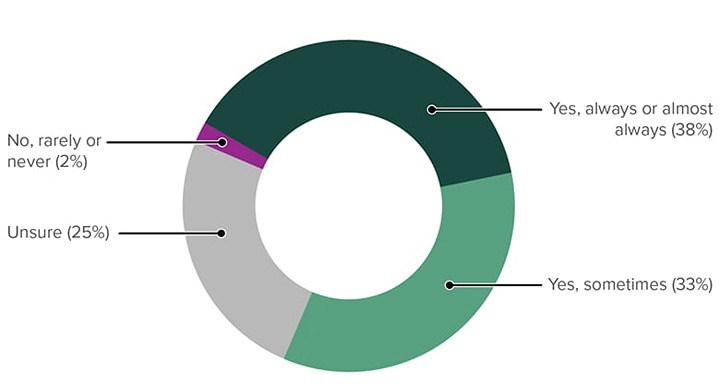
When accessibility compliance is required it does not always mean it is delivered when outsourced. In a survey targeted at government practitioners involved in the accessibility of government services, 70% said that their organisation outsources to external suppliers support in designing, developing, or delivering digital services or information.
Of these respondents:
- 38% said that accessibility compliance is always or almost always included as a requirement in contracts or statements of work
- 33% said it was sometimes included
- 25% were unsure.
- 1 respondent said that accessibility compliance wasn’t included as a requirement in this context.
In interviews with suppliers that work with government organisations to deliver digital products and services, suppliers said that accessibility requirements were always included in initial contracts, but that the accessibility delivered was often affected by clients’ decisions made during the delivery process.
The only time when we fail any WCAG guidelines is because the client has expressly told us to.
Suppliers emphasised that their experience of contractual requirements was that although contracts always included questions around how suppliers met standards, this didn’t always correlate with a client’s commitment to accessibility, and that it was up to the client’s delivery team to guide suppliers on project goals.
The first interaction with accessibility for government clients is that there’s always the question in the RFP about ‘How do you support or meet the standards?’
We copy and paste our blurb on how we do accessibility into the RFP … [it’s a] cookie cutter question that every government client has. It’s just worded slightly differently, worded in a different way.
Procurement teams lack the expertise to accurately gauge the accessibility capability of suppliers, and requirements are often not specific enough
In workshops, government practitioners emphasised that the procurement process is a key stage in ensuring that services will be accessible once delivered, but that those involved in procurement process on the government side did not have the experience to establish whether a supplier was capable of delivering accessible services.
Adding clear requirements for meeting government web standards — with appendices of the WCAG success criteria — helps in the procurement process. It often means educating BAs and architects, or getting buy-in from procurement to add it as a locked requirement for all digital products templates.
Practitioners said that a poor procurement process was a barrier to delivering accessible services, and that it was often difficult to gauge supplier’s capabilities. Often suppliers claimed better accessibility knowledge than they were able to deliver, and it would be beneficial to “reward” suppliers for their ability to historically deliver accessible products and services.
A bigger carrot would incentivise suppliers to produce work that is compliant — Marketplace has tiers for security providers, [so it would be good to have] something that rewards a supplier for producing more compliant work than other vendors.
Procuring “off-the-shelf” tools often have negative accessibility outcomes
Workshop participants said that off-the-shelf tools that were procured from suppliers were harder to update, were often associated with poorer accessibility, and that there was a lack of pathways to resolving issues with products and services.
When I started 10 years ago, we did a lot of bespoke tech — it was a lot better for accessibility etc. Now we’ve got Salesforce etc., and with these huge systems we have to design based on that … that’s limiting our customer experience because the customer experience is defined by those set projects — you can configure them but the support team have to manage that. The people who define the vendor bid — it would be good if we had more technical expertise involved in that.
In my organisation, [issues are] more often to do with procurement, and less our own creation — something appears out of nowhere that someone with money and power wanted fast. Off-the-shelf often isn’t as good — it doesn't quite fit needs, so we get it modified by a vendor who doesn't know or care.
Accessibility is considered when procuring suppliers for creating digital services, however it is often balanced against other factors, and considered a lower priority than other aspects
When selecting an external supplier for digital services, 25% of respondents said that accessibility capability is “an important factor, [but] balanced against other considerations”.
10% of respondents said that it was a “critical and highly weighted factor”, while 13% said that it is a “minor factor, or considered nice-to-have”. 35% of respondents were unsure, with 10% giving “other” feedback.
Several respondents noted that accessibility compliance was largely dependent on specific project requirements, or that suppliers are trusted to deliver what they say they can.
In workshops, service design and accessibility practitioners said that accessibility was often considered a “nice-to-have”, and wasn’t given a comparable priority to security, privacy, and other “technical” factors.
There’s a lack of awareness in senior management about usability and accessibility standards … it always feels like a fight with management, like an add-on or ‘good-to-have’ — it’s not considered like privacy or security. There’s no enforcement — no ‘fear of god’ that you'll be reprimanded or held accountable.
If there's a time crunch, the first thing that gets sacrificed is accessibility … it always feels like a fight from below to management. Some kind of enforcement, or ‘stick’ is important to get people to take it seriously.”
Some government organisations use a variety of methods to assess suppliers’ ability to deliver accessible work, but not all organisations can do this
Survey respondents noted that a range of methods were used to assess whether a supplier was able to deliver accessible work, including:
- Looking at evidence of previously completed work that is accessible (35%)
- Relying on a supplier’s claims or reports of accessibility compliance (31%)
- Verifying a supplier’s testing processes for accessible delivery (15%)
- Reviewing an Accessibility Conformance Report (ACR) or Voluntary Product Accessibility Template (VPAT) supplied by a supplier (13%)
21% of respondents said that their organisation does not have a process to verify suppliers’ work is accessible, and 33% were unsure of which methods might be used.
One respondent said that they use the accessibility of a supplier’s own site as an indicator of their accessibility capability.
I went to every vendor's website that said they were accessible and ran an automated test over the home page. Most of them had seriously inaccessible sites.
Other respondents to the survey emphasised that long-term relationships with suppliers were key in supporting the delivery of accessible services.
We have worked with our design suppliers to bring them up to speed with our accessibility requirements — it's been well worth the time to do this as they now have a thorough understanding of our needs.
2.1.2.4 Government-practitioner relationships during service delivery
Government practitioners say that suppliers often lack a deep knowledge of accessibility
In workshops with service design and accessibility practitioners, participants said that many suppliers claim to have a deep knowledge of accessibility and how to apply it to the delivery of products and services, but many fail to deliver on their claims. They emphasised that the current procurement process fails to identify suppliers’ capability before contracts are signed.
We’ve got to a point where vendors are very good at selling themselves and saying the right thing, but you go and use them, and they're full of crap. The current set up has led to a swath of vendors who can say the right things, but it doesn't result in them being good.
Another participant noted that suppliers are generally capable at more technical aspects of contractual agreements, but fail when it comes to delivering services that meet service design and accessibility standards.
A lot of the vendors on the AoG don't understand standards — they understand the security stuff they have to go through, but not the rest.
Another participant said that suppliers often think they are meeting standards, but this is not the case when services are reviewed or audited. They noted that this isn’t universally their experience, and that some suppliers do have a good knowledge of accessibility and a willingness to improve — but that these vendors tend to be the exception.
Suppliers will always say they know about accessibility — finding someone you can work with, that you can bring up to the right level [is key].
Suppliers say that government clients often lack a deep knowledge of accessibility
In interviews with supplier practitioners, representatives of supplier organisations said that most government clients are happy to support accessibility but can lack knowledge of accessibility at a deeper level. Suppliers will often educate, advise, and inform clients of best practice, but will sometimes have to make compromises around usability and accessibility based on clients’ preferences. In most cases, if making products or services accessible does not cost additional time or budget, clients are happy to support this process.
There are situations where products are delivered to a client that are initially accessible but become inaccessible over time — often due to how a client manages their site or product. For example, a client may create new banners for a site, adding text into an image instead of including it as accessible text overlaying an image.
Most organisations, particularly in government, are very aware of accessibility, but at a relatively immature level.
We try to take people on that journey with us in terms of understanding.
No matter how easy we make it, no matter the tools we give them, you just sort of watch the impending doom happen.
Suppliers say that it is ultimately up to clients to determine how well a project meets the accessibility standard
All interviewed suppliers of government digital services agreed that the final decision regarding whether a product was accessible sat with their client. Suppliers said that some clients view accessibility as an edge case or prioritise features that are not accessible. Clients may have a preconceived idea of a feature that they want delivered, and insist a supplier deliver it — even when the supplier attempts to guide better decision-making regarding accessibility. Ultimately, suppliers are required to deliver products that their clients are happy with, even where they do not meet a supplier’s own guidance on accessibility.
Even when clients show good intentions towards accessibility, clients may introduce small changes towards the end of a project that impact the accessibility of the delivered product or service.
You just try and keep the client happy to get the job done, as opposed to pushing to get those standards met as well.
If the client decides that they want something at that point, we can advise, we can suggest, we can encourage — but it is theirs in a way that if you’re working in house, it’s a little bit different.
Suppliers are often constrained by small budgets and tight deadlines
All suppliers that were interviewed said that a lack of time and budget was often the reason that they struggled to follow good design and delivery practices and deliver accessible products and services. Suppliers said that they try their best based on the time they are allowed, but may not always be able to deliver services that align with best practice within a small budget. Some suppliers noted that budgets are smaller than they were 2–5 years ago.
Suppliers said they are forced to be pragmatic when delivering within small budgets and often have to compromise on research and user testing as a result. The size of a budget may affect the accessibility of a product, and products that are delivered may not meet 100% of the requirements of the accessibility standard as a result.
It's going to take you another 20 hours to make absolutely sure that it makes AA accessible, [developers will] look to try and do stuff in 10, because the project’s got to be delivered.
We’ll say [to clients] ‘why don't we do this? It will improve accessibility’, and they’ll say, ‘how much will it add to the budget?’
Budgets are ridiculously smaller than they were 2–5 years ago.
2.2 Lived experience of disabled people interacting with government
This section captures the lived experience of disabled people and their experience interacting with government services, as well as the DPOs who represent them.
It highlights the persistent accessibility barriers they face in interacting with government services, a need for alternate formats, and their experience in providing feedback and participating in user research.
2.2.1 Disabled people’s experience of government services
Disabled people in Aotearoa New Zealand continue to face widespread barriers when interacting with government websites and services, many of which still fail to meet the current accessibility standard. Common issues include inaccessible forms, information locked up in inaccessible PDFs, and processes which emphasise security over the ability of disabled people to access services.
The digital divide remains a major challenge for many communities. Also, a lack of plain language makes complex information overwhelming and inaccessible for many. Representatives from different communities support the continued use of te reo Māori in government services, but highlighted barriers they face when trying to access content. Participants emphasised that alternate formats are essential to enable independence and dignity, and that standards should align with international best practice without exceptions that may further exclude disabled citizens.
2.2.1.1 The experience of disabled people interacting with government
A vast number of websites and services continue to be affected by common accessibility pitfalls, and do not meet current standards
Disabled people and DPOs raised common accessibility challenges they continue to face as part of their everyday interaction with government. This included participants that worked within government organisations.
Participants shared a range of challenges they face, all of which should be addressed by the existing Web Accessibility Standard, including:
- A lack of labels on buttons and image links, which are required by those who use screen readers to understand content and navigation within websites.
- Alt text on images, particularly where more than 1 line of text is required does not currently get an adequate description — which includes map-based information
- Content hidden inside accordion components, which is a problem for people searching for content who do not see or find it, and can be impossible to access through assistive technology when built inaccessibly.
- Sites that do not support zoom levels, which is required by those with low vision.
- Small interaction targets, which makes interaction difficult or impossible with for those who have disabilities that affect their fine motor skills and hand-eye coordination.
- Time-based interactions that time out before users can complete a task, which can make processes inaccessible for many people — including those with motor impairments or learning disabilities like dyslexia.
- Pages that do not reflow responsively which can result in content being too small, or require horizontal scrolling with content obscured outside the frame of the device.
- Pages that have an inconsistent tab order affecting those who use the keyboard to navigate, or have low vision.
- Text that does not meet accessibility requirements for colour contrast, which affects those with low vision.
- Sites that include flashing or moving effects — which can impact people with photosensitive epilepsy, motion sensitivity or attention disorders.
- Forms with validation that does not allow a user to understand or correct problems with their submission, which in many cases lead to a user having to guess what’s wrong, or get assistance from a non-disabled peer.
You have to go looking for that list of things you haven't noticed, and you don't know where you've gone wrong. ‘You have to fix the ones that are marked in red’ — great awesome, that's not helpful in the least.
Disabled people can face barriers when accessing services they depend on due to inaccessible government tools and processes
Participants highlighted specific examples of services that were inaccessible to them.
RealMe was often cited as a particular barrier, particularly as a pathway to other services like renewing or receiving a passport.
A key challenge that was cited included being “timed out” of the service before the process could be completed, which required support from a non-disabled peer to complete. One participant also noted that the requirement for an email address was a blocker for those without one.
Other participants shared that the use of RealMe across government services was inconsistent, with some services using it, and others not.
Passport services were also cited by research participants as difficult to complete for those with vision impairments, who had to get assistance from a peer, and for those with sensitivity to flashing or strobing.
I had to get a passport, and at one point it flashes light in your face. There is a seizure warning, but it's buried. Suddenly it starts flashing light in my face. It ruined my day and I had to spend the rest of the day in bed.
Police vetting forms were highlighted as a PDF-based process that was hard or impossible for those with visual impairments.
We are trying to get police vetting forms accessible as well, so it’s something that we have to do on a regular basis. When you start a new job, and it comes in your inbox and you know you have to do it again you're like ‘oh my god’.
The digital divide is a persistent barrier to many members of the disability community in accessing services
Across different communities, participants shared that many in their community didn’t have access to any digital devices, or only had a cell phone. In cases where people do have a cell phone, it is often an older phone model, and many have limited amounts of data.
Many people don't have computers or mobiles. I'm the only one who has a mobile phone and a computer.
A lot of our people have individual disabilities as well as high needs — often they have no computer or cellphone. That will always be a problem for our people, some people will need support to go to the library with them and do that.
Among representatives of Aotearoa New Zealand’s senior community, participants shared that the digital divide was widespread.
In a retirement village of about 350 people, 80% don't have a computer or don't know how to use one, so how is the government going to communicate with them?
The folks we deal with have skills at a basic level, which is not a problem until you need to re-license a vehicle, or register your pet dog, or deal with Inland Revenue, or renew a passport. This often requires us to download a particular app or enter a link supplied by the organisation.
One Deaf participant shared that some services still require phone calls as part of their processes.
They want to call you and they want a date from you — that's pointless for me, I'm never going to answer. I have to use the relay service … it can be very complicated for Deaf people.
Government websites and services include a large amount of overwhelming information, and plain language use is still uncommon
A wide range of disabled participants shared their experience of struggling to understand complex information that was dense, overwhelming, and not in plain language.
This is a challenge not only for disabled people, but often for peers, carers, or support people who disabled people rely on for help completing everyday tasks.
Deaf participants shared that websites rarely include NZSL assistance for navigating a website, despite NZSL being an official language of New Zealand. This means many people in the Deaf community are navigating government websites in their second language.
Navigating large, complex websites is also a persistent challenge for disabled people. They are often further confused by not knowing which government organisation’s website they should be on in the first place.
Just knowing about them — some of the government websites are beasts — huge! To actually easily know what site to jump onto in the first place — some of these sites are really big and with a lot of information, and it can be quite difficult to get to where you need to go.
Searching for content is also a barrier for many people, both in knowing the “correct” term to search with, and to understand the large amount of information that may be presented as search results.
When you search for something and a whole lot of options pop up, and some of them are not necessarily what you're searching for — that gets a bit confusing, you can get a bit overloaded or distressed.
Inaccessible security processes are regularly prioritised over making services accessible
Participants shared their frustration that security practices often created accessibility barriers.
This impacted a wide range of disabilities, and presented in many ways, including:
Complex password requirements and frequent log-outs that disproportionately affect those with learning disabilities, motor impairments, or who use assistive technology.
Two-factor authentication is challenging to those with a range of disabilities, particularly when the time given to complete a code is very short — common in many authenticator apps.
Two-factor authentication was noted as something that became significantly less of a challenge when it was implemented consistently, across government services, used familiar processes and interfaces, and allowed more time to enter a code.
CAPTCHA systems — both visual and auditory — were raised as challenging for many participants, but particularly for blind users who must complete the audio version of a CAPTCHA. For blind people who also experience hearing loss these challenges can be impossible to complete, and make services entirely inaccessible.
Note: Previous research has identified that auditory CAPTCHA is very difficult and nearly impossible for everyone.
When you have to identify you're not a robot with pictures — especially when you get to the end of a long form … I've cried in the past. Sometimes they have an audio option, but that’s hard.
Services that require personal identification (ID) was raised by a large number of participants as a major barrier. This is particularly common with disabled people and older New Zealanders who are less likely to have official government-recognised ID.
‘Send us a copy of your driver's license’ — if I had one of those I would.
Face and voice recognition was raised as often not “recognising” those with disabilities that affect their appearance or voice, particularly with automated systems that are designed to scan people’s faces at airports, or as part of a passport application process.
I can't do Face ID or face scanning at airports — it’s useless to me, it doesn't register my eyes. It doesn't register my face.
Content is often “locked up” inside PDFs, which can be challenging or impossible to access
Many disabled participants shared that government information they are looking for is often only available in PDF form. This is a particular barrier for people who are blind or have low vision. Participants shared that blind users often must figure out how to navigate PDFs through “trial and error”. Options on how to open or download PDFs across different services are not obvious or consistent.
When PDFs contain scanned images of text, content is entirely inaccessible to those who use a screen reader to navigate digital services. Even when PDFs contain actual text, they are often still more difficult to navigate and to “tab” through than an equivalent Word document or HTML web page.
Generally, users shared that Microsoft Word documents were more accessible than PDFs, though they still required people to create them as accessible documents.
One of the biggest barriers is that staff don't know how to create accessible documents. No one teaches staff — people have to learn by finding out they've done it wrong, which isn't a great experience for them.
They might be offered a short training course, but documents have so many elements, like alt text through to ‘how do I put an accessible chart in here?’
Forms provide an additional barrier for disabled people, both in the language they use, as well as inaccessible form elements
Research participants expressed frustration at all the inaccessible forms they must complete when interacting with government: both due to complex language that was difficult to understand, or for technical reasons that made them unable to be used with a screen reader or other assistive technologies.
Forms that were part of a PDF were often completely unable to be used with a screen reader, and Word alternatives were not available.
It’s not okay for a government website to say ‘oh, just phone us and we’ll help you’. It strips away people's independence and dignity.
We hear about that often — people can do their job, but then need someone to fill in a form for them … it’s not a great look.
Complex language and questions in forms also provided a barrier to those with learning disabilities, and meant they were not able to complete forms themselves.
Comprehending the question that they're asking — that's what takes a long time with the form. Thinking about how they want me to answer it, understanding what they want you to put down.
I can look at the info myself, but when I'm filling in the form is when I need to get someone to help me.
There are online services and tools that are accessible for disabled people, and enjoyable to use
Beyond the government services they interact with, a number of participants highlighted a range of other services and tools that they use regularly, and that are not a challenge to use.
Participants emphasised that tools, apps, and services that were easy-to-use, accessible, and intuitive were ones that they enjoyed using, and would come back to.
Social media apps are generally easy and enjoyable to use, and participants highlighted Instagram, WhatsApp, YouTube, Spotify, TikTok, and Facebook Messenger as all providing accessible experiences, with considerations made for how disabled people might use them.
AI tools were also noted as generally having good accessibility, and could even help make other inaccessible sites more accessible.
I'm just grateful I have ChatGPT on my phone — I just take a screenshot and it figures it out for me.
2.2.1.2 Navigating a multi-lingual Aotearoa New Zealand
Te reo Māori is an important part of Aotearoa New Zealand, and should continue to be used on government websites
Participants from a range of disability communities supported the continued use of te reo Māori across government websites and services, and emphasised its importance.
Deaf participants emphasised that in many cases English was their second language, and that adding content from a third language to a page could increase the amount of information that they had to process, which should be a consideration when designing services.
Participants also said that in a country with three languages, it’s important that all people can access information in the language that is best for them.
The challenge is that New Zealand has three languages, and everyone should have the right to information in the language that is appropriate to them … how do we make sure that information is provided for everyone in the right way?
It is important that English is written in plain language as a foundational part of access to information
Participants emphasised that a lack of plain language English was often a greater barrier than the inclusion of some reo Māori terms and phrases.
For Deaf participants reading English content in what is often their second language, a lack of plain language is a regular information barrier.
Māori Deaf people would appreciate the Māori, NZSL, and English all provided for them, and having the info there in 3 languages would be so good to have, particularly in a video format. The two [written] languages as captions or text, and then have someone signing. I don't know if it's even possible, but it would be great.
Participants shared that for navigating services and websites, unclear English was often a much greater barrier than when website navigation and menus included both English and reo Māori labels.
For screen-reader users, te reo Māori is almost entirely inaccessible, and rendered with a poor “English” accent
Users of screen readers emphasised that there is not currently a screen reader available that supports well-pronounced reo Māori, and that screen readers will default to using an English synthesiser when reading in a predominantly English context.
This can make reo Māori terms hard or impossible to understand, as they are pronounced based on a screen readers interpretation of English spelling and phonemes.
Some users noted that they had tried setting reo Māori language tags to be interpreted as other languages with comparable pronunciation — such as Japanese or Spanish — but that this was a poor workaround.
Can the government invest in speech synthesis for te reo so that te reo and other pacific languages are able to be respectfully spoken? Working with kāpō Māori[Footnote 1], most te reo-speaking blind people would prefer the English version because the speech synth does such a bad job.
Where te reo Māori is used, it should be programmatically distinct from English
Although voice synthesisers for te reo Māori is very limited, participants noted that it is important that semantic HTML should use the “lang” attribute to ensure that screen readers do know when one language stops and another starts. This helps screen reader users understand information more easily, and means that when a high quality reo Māori voice synthesiser does become available, screen readers will be able to select the appropriate synthesiser to use.
Blind participants noted that when headings, navigation, or content places te reo Māori before the English equivalent, it does mean that it takes them longer to get to the English and navigate content due to the inability to visually skim content — but that it is important to continue to include reo Māori.
Where te reo Māori is used, it should be visually distinct from English
For those with learning disabilities, participants said that it could be difficult for them to understand content when English and reo Māori were combined in the same sentence, and difficult to understand when one language stops and another starts.
Participants shared that it was easier for them to understand when content in English and reo Māori sit on different lines, or on different sides of the page. One participant with low vision shared that using text size to distinguish different languages can make the language that is smaller harder to read, however.
Where a lot of information is in te reo Māori, separating a site into two different language versions aids understanding
Disabled people shared that generally including reo Māori in mostly English text does increase the time it takes to consume information, and can make understanding more difficult.
When sites use more than a small amount of reo Māori, participants suggested that it is best for sites to support a dedicated bi- or trilingual mode, with options to access content on a dedicated page that presents information in the language they are most comfortable with.
This helps people who can be impacted or overwhelmed by a large amount of content, particularly when they are reading in a second or third language already. Participants noted that many government websites were moving closer to a 50-50 split of English and reo Māori in some contexts, which makes content harder to access.
2.2.1.3 The experience and need for alternate formats
Alternate formats are necessary to empower a large number of people within the disability community to access and engage with services independently, and with dignity
Alternate formats are fundamental to enabling people to independently access important information and services, and integral to supporting the human rights of disabled citizens of Aotearoa New Zealand.
Disabled people and DPOs emphasised that those participating in user research represented the more “online” members of their communities, and that a large number of disabled people are highly impacted by the digital divide that affects their ability to access online information and services.
If you're trying to get us to chuck our non-digital members under the bus, then I'm not going to do that. We are information poor, we are not best served, and there are a lot of blind who are not online, and who aren’t digitally connected.
You're in a sense asking the wrong people because we are here!
I'm not going to chuck anyone else under the bus and say a well-structured web page is enough, because it’s not.”
Participants also emphasised that people in disabled communities are not all the same — for example, not all Deaf people are proficient in New Zealand Sign Language. can
A significant number of blind and low vision New Zealanders do not use Braille, and do not have access to digital Braille readers, which can be very expensive. Even those who are comfortable and proficient using screen readers or magnification techniques can benefit from content that is available in an audio format, which can lessen fatigue, and make content accessible to them.
Alternate formats can supplement “general” information and provide additional ways of communicating content. For example, in some cases an audio format can support understanding visual content where alternate text is missing or inadequate.
Participants noted that Easy Read documents are often chosen by executives and other time poor people who need to consume information quickly.
Participants also noted that engaging with web pages can require a high skill level and digital literacy that is not possible for all ability levels, ages, and demographics.
For senior New Zealanders, the digital divide can be a significant barrier to engaging with government services.
For an example of one of our users — he was an elderly gentleman — in his late 70s — he had a tiny flip phone with a small screen. He got a text saying ‘your firearms license is due, go to this website’, but his phone couldn't go to the site. He had a laptop from family, but he had no idea how to use it. We helped him get to the firearms license website, [where he was] immediately faced with ‘RealMe’, which he didn't have.
There's a generation that hasn't grown up in a digital world.
Well-structured semantic HTML web pages are important and useful for many people, but in practice, are rarely “perfectly” executed
Some individuals shared that for them well-structured semantic HTML web pages were their preferred way of accessing information.
[For me] structured HTML is the ideal — if it's a large volume of information I can jump between headings, paragraphs, etc. Those that are using [digital] Braille would prefer that to be HTML, since screen readers aren't just speech — people will have a Braille display, which can output a page as Braille. That's more effective than a hard copy of Braille — it's refreshable and I can jump though as I like.
One participant with low vision noted that well-designed digital forms were in many cases easier to access than those that were paper-based, even for those with some vision.
Other participants noted that in practice, it was rare to see semantic HTML web pages and plain language executed perfectly, and that alternate formats were still important for enabling many people’s access to information and services.
From an alternate formats perspective — if the website is designed properly, and it has all the semantic markup that is required, the theory is that we should not need a PDF of it or a word doc of it, or large print.
I think there are times when an Easy Read version is needed 100% — even though we have the Plain Language Act, it's never been implemented properly … Easy Read is easy for everyone, not just those with learning difficulties.
Plain language needs to be the baseline for accessible content, and well-structured HTML does not address the issue that a lot of “standard” content is unnecessarily complex and hard to understand
Participants consistently reiterated that plain language should form the baseline for accessible content — both within the context of providing alternate formats, and across government information and services in general.
Participants said that language used on government sites often uses a large amount of jargon and language that is hard to understand, and that a primary focus should be on making sure that all content is written in plain language in all cases.
Word documents generally provide a good baseline for offline distribution, and are more accessible than PDFs or content that requires an internet connection
Participants said that information that was only available as a PDF could be very restrictive, and could be hard to process or consume using assistive technology.
Where information was available as a Word document, this allowed users to manipulate the size of text, colour contrast, and the font used, which could be helpful for users with low vision, or disabilities like dyslexia.
In contrast to web-based information, Word documents could also be downloaded and stored. The documents could be printed or saved on external devices to be shared with those without an internet connection.
[The government] needs to stop using PDFs. Amongst the problems is not being able to change things — which is the point [of PDFs]. Things like when I’m reading a long consultation, I'll stick in some asterisks so I can find my place again — you can't do that with a PDF, it’s not easy to jump around in. I’d much rather have a Word doc or structured HTML.
Alternate formats should be easy to find and as accessible as other information
Participants from different disability communities said that it was often hard to find alternate formats, that documents could be scattered across multiple locations, and that it could be hard to navigate from “general” information to its equivalent alternate format — even when it did exist.
Many participants said that they preferred being able to go to a “single source” and find all available alternate format information there. It is important that information is presented consistently, and in a way that is easy to find.
For Justice, [the information] is very complex, and spans many agencies. For disabled people it's difficult navigating so many processes and systems … maybe it would be helpful for a one-stop-shop tab for alternate formats.
The solution is one prominent place for accessible formats. During COVID, you had to click through 3 or 4 places [to find alternate formats]. You need a consistent and easy way to reliably say ‘this is a government website, that's where the accessible tab will be’.
Participants shared that there was often pushback from communications teams to publishing information in more than one place, which meant that alternate formats were harder to find for the disabled people looking for them.
In the past when working with agencies, [we were] pushing for a ‘hub’ for all NZSL or Easy Read on one page. We got push back from the comms team, saying ‘we don't want a double up of information — it’s hard to update.’
It's easy, you're not talking about 500 videos. [The problem] can be an attitudinal approach from comms — not the structure of the site itself. Just because they're worried about updating 2 pages.
Vote.nz, run by the Electoral Commission, was specifically called out as an example of a good “template”, in presenting alternate formats prominently on the homepage, with a link to a single page that contained all relevant alternate format information.
Other participants from the blind community emphasised that they preferred using “websites that everyone else uses” over a dedicated hub for alternate formats, however this requires deliberate and considered content creation that emphasises plain language and well-structured information.
If a comms person is writing something, it should be using well-structured sentences, and the basics should be put in place. We don't want a website that's just for disabled people. We want to use the website that everyone else uses.
If a website has been built to best practice and [follows] guidelines, there might be some things we have to learn, but we might pick up some things [that aren’t accessible, like buttons not being labelled correctly].”
Certain content should be prioritised for alternate formats when it is critical to people’s lives and wellbeing
Participants emphasised that alternate formats are important, and should be prioritised for particular content, including:
- Content that is critical and time-dependent, and affects “life and death” situations like disasters or emergencies that affect entire communities, like floods and earthquakes.
- Government services that all New Zealanders will generally need to engage with. This includes things like understanding and paying tax; passports; births, deaths, and marriages; and police-vetting forms when applying for a new role.
- Information that is important to all New Zealanders, even if it doesn’t specifically relate to government services. This includes things like applying for jobs, housing and property, and KiwiSaver.
- Information that affects citizens’ ability to engage with democracy, like information about parliamentary processes and consumer rights — particularly information that relates to changes in laws that relate to disability issues and standards.
- Information that relates to information and services that disproportionately affect disabled people. A large number of participants expressed frustration at the difficulty in understanding processes related to MyMSD, benefits, community services cards, and changes to their rights and obligations that were often not broadcast in a way that was accessible to them.
Not all alternate formats have the same uptake, but they all empower New Zealanders in accessing information and services they depend upon
Participants noted that even though different numbers of New Zealanders are affected by different disabilities, and different formats have a wider audience than others, they are all important in allowing New Zealanders to access information and services that are important.
“I don't personally use BRF[Footnote 2] or hard copy — I would just use my Braille reader for those ‘fleeting’ things.”
But it should be available for those who do — I don’t want to limit formats for other people.
Service design must ensure continuity of access for disabled people during disasters and infrastructure disruptions, even where alternate formats are available
DPO representatives and service designers both emphasised that even when alternate formats are available, designers of services need to ensure they are considering how people will access information and services when they are disrupted by disasters or interruptions to electricity or communication channels.
Business continuity — that's something that's come up a lot in the last couple of years — with COVID and floods in Auckland and Hawkes Bay, realising that sometimes a service might be out for a couple of days, or a week and how do you design a service — what's the backup?
Whether it’s switching to paper because there's a cloud disruption, or in the cloud because you can't do things in person.
In cases where alternate formats are impossible or can’t be delivered in a timely fashion, it’s important that members of the disabled community still have access to information and services vital to their health and wellbeing. This may require formats and thinking beyond that mandated 5 alternate formats.
During COVID this was a major issue, because the government updates were coming so thick and fast that Blind Low Vision NZ were unable to create Braille or low vision copies. What they did was give them Alexa devices from Amazon, and gave them verbal updates.
In quickly changing or emergency situations, alternate formats were often too “static”, and processes for creating alternate formats were too slow to keep up with ever-changing information.
Increasingly what people need to interact with is ‘live’ content — alt formats tend to be ‘static’ content. Ideally, we'd move to live content that reaches as many people as possible. There won't be government processes that aren't online processes very shortly … we'll never get enough static content for those processes.
2.2.1.4 Balancing ambition with pragmatism
Introducing exceptions to the accessibility standard reduces disabled people’s already limited access to information and services, and will negatively impact their access even further
Participants emphasised that if the accessibility standard seeks to introduce exceptions to international standards, it only harms the people for whom the standard is written.
Disabled communities are already disadvantaged by information and services that do not meet existing standards, and introducing new exceptions to these standards will introduce new scope for even lower standards of accessibility.
Participants noted that in its response to COVID, government was able to work quickly under pressure to support the needs of non-disabled people, but that the same priority is not given to those in disabled communities.
On another episode of Attitude[Footnote 3], they gave a good example about COVID — before COVID this girl couldn’t get around uni, and asked if she could work from home, and they said no. But bam! — a pandemic happens and it's suddenly okay to work from home. If able-bodied people need something to change it’s okay, but not disabled people.
[It's] a real bizarre question for a government organisation to be saying they have limited time or budget to be able to incorporate accessibility and meet requirements, full stop.
During COVID there was a lot of stuff that had to be stood up very quickly, with limited time, and limited knowledge. They still managed to employ accessibility experts, incorporate it from the beginning, test for it, and fix it.
That shouldn't be a question we should be asking — how can a government organisation that has signed the UNCRPD[Footnote 4] even be contemplating asking a question around what should be prioritised?
Participants said that “deprioritising” aspects of international standards such as WCAG[Footnote 5] or EN 301 549[Footnote 6] effectively deprioritised disabled citizens from being able to access essential government information and services.
‘Who should be prioritised?’ is what they’re asking, right? If we’re prioritising one thing over another, ‘who’ decides ‘who’ we're going to exclude from that particular content? I get that there are time and budget restraints, but it doesn't cost a hell of a lot to be thinking about [accessibility] right from the beginning … the government is asking ‘what should we prioritise?’ when there are global standards that state that we shouldn't be doing this ever. Every other English-speaking country in the world and the whole of Europe insists we should be meeting these standards.
New Zealand should align with established international standards in order to keep up with worldwide markets, and to avoid creating harmful exceptions to proven standards
Participants noted that some New Zealand companies have already experienced the consequences of not meeting international standards when trying to enter international markets, where higher accessibility standards are tested for and enforced.
Not encouraging those working within a New Zealand context to meet international standards makes it harder for New Zealand-based organisations and companies to engage in a global market, and locks them out of the economic benefits of being able to do so.
If we’re not doing accessibility properly here in New Zealand, we are doing a disservice to every single software developer, website, product, app, service — we're saying “it's okay to be inaccessible in New Zealand” — but if you want to enter the global market you have to be accessible.
We know we have software companies here in New Zealand who sell overseas, who’ve been dragged through court cases [after entering international markets] because they didn't comply with [local] accessibility requirements.
Non-disabled leaders, decision makers, and practitioners within government need to show allyship, and push back on barriers to funding of accessible services
Participants emphasised that it was important that non-disabled people with influence on the design and delivery of government services should show allyship in fighting for the rights of disabled people, and that services were adequately funded to be accessible to all in their design and delivery.
What needs to happen is that those in the so-called “mainstream”, or ‘fully-abled’ need to stand shoulder-to-shoulder … it’s been shown historically [they come for disabled rights first] then everyone else … there is no compromise. You can't compromise.
Accessibility should be considered holistically, and from the perspective of those who experience disability, not purely as an inflexible set of requirements to follow
The New Zealand’s Web Accessibility Standard currently include an “exception” to WCAG that allows videos to not include audio description, provided that an alternative description of the video is available and accessible.
When responding to this example of an exception to formal guidelines, participants shared that it was useful to frame accessibility from the perspective of a disabled person that is trying to complete a task, rather than viewing it as a list of requirements to meet.
Every small improvement in accessibility supports disabled people in some way
Participants shared that even small improvements in the accessibility of information and services could be impactful for disabled people who rely upon those services.
It makes a difference when something has a caption — even if it's just a ‘this is XYZ logo’. Even those small things make me think ‘someone's thought about me’, whereas if you start and it’s just ‘image, image, image’ you think ‘okay, here we go’. Those small captions make it more accessible, and I don't think it takes a long time to add those captions.
2.2.2 The state of feedback processes
The process for disabled people to provide feedback on inaccessible government services is opaque, slow, and difficult. Many people are fatigued from repeatedly reporting issues with little to no response, leading them to “pick their battles” or give up giving feedback altogether. There is a strong desire from the disabled community to be actively involved in the design and testing for government services, particularly being involved in the initial project research at the start, rather than just testing at the end.
Practitioners acknowledge this gap and the ineffectiveness of internal feedback mechanisms, but are often constrained by a lack of funding, resources, and processes to either engage with disabled users or action the feedback they receive.
2.2.2.1 The experience of giving feedback on government services
Different people require different methods of providing feedback that are accessible to them
Members of different disabilities communities shared that providing different methods of giving feedback was important to accommodate a wide spectrum of disability and preferred ways of communicating.
Many participants noted that they would prefer to be able to phone someone, but that it was important that the person on the other end “understood accessibility issues”.
Some Deaf participants shared that it would be useful for them to either use secure text-based chat, or a communication tool like Zoom that had built-in auto captioning — particularly for Deaf people who were unable to — or preferred not to — utilise a third party like New Zealand Relay Service[Footnote 7] or a sign language interpreter.
Other methods that were shared as being accessible for many people were being able to write a direct email to someone, fill in an accessible form, or use a small survey widget to provide feedback.
A general consensus was that services should have a variety of accessible methods for providing feedback and communicating with government services, and that methods for feedback should be well-considered and accessible.
Phone calls are the best option for many people, however government services are decreasingly providing phone numbers to call, and introduce other barriers to this way of providing feedback
Blind participants generally shared that they would prefer to be able to communicate by making a phone call. However, it was difficult to find ways to provide feedback or contact government services, and that phone numbers were becoming increasingly difficult to find.
Recently I had an experience where an unsolicited email came into my inbox — we are taught to be cautious about these — and it was from Health NZ … I didn’t recognise the terminology, and there was nowhere to go to ask a question … I didn't have anywhere I could phone, no email address to send a question to, it just left me floundering. I went to a source that gave me inaccurate information — it goes from bad to worse.
Many Deaf participants noted that they depend on relay services in order to make phone calls, however many public and private services either refused to engage with someone using relay services due to a third party being involved, or didn’t understand what was happening.
Other participants shared that some services required contact to be made via phone call, which was difficult for those who were Deaf or hard of hearing. This was additionally challenging when phone calls involved waiting in queues or awaiting a callback at a non-specific time — particularly when times had to be organised with a relay service or support person.
On many government websites, participants noted that it was often a challenge finding a way in which they could provide feedback.
Finding feedback channels often requires navigating complex menus or using a search function. This can surface a large amount of inaccessible information that has to be navigated, and can be difficult for many users.
It's so hard to find phone numbers nowadays, it's an absolute nightmare. You have to go through so many menu choices, and then you don't end up talking to anyone anyway!
Feedback processes for government are opaque or slow, and people often do not know if they will receive a response, or action related to their feedback
Disabled people noted that it was important to know how their feedback would be actioned, but that processes for understanding this were opaque or non-existent.
Requests for alternate formats could take months to action, and disabled participants working within government shared that processes for making internal tools accessible were blocked by third parties.
You often get comments like ‘oh this is a third party provider, this is what it does, and we're not able to change it,’ which is a disappointing response.
It makes you wonder ‘did you do your homework in the first place when checking how accessible this provider is?’”
There needs to be a way to track that info and get updates — to ensure it’s on the list to update. ‘We've implemented a workaround’, or something.
Once you start a dialogue with someone at an agency, it's usually pretty good — you've got a name and an address. People don't go out of their way to make a website not accessible — often it has been tested, but people just don't know.
Several participants shared their experience of providing feedback with private organisations as a contrast, noting that they were often responsive to fixing issues. Private organisations could be less aware of accessibility concepts, but quicker to fix issues once they were made aware.
With a phone app I use, I suggested to the makers of the app to add something to the app — I said they should give more time to jot things down, and they actually made the change and let me know through email, and not long after I saw that on the app.
I’m not sure this stuff is particularly hard — it’s not that it's not possible, it’s that compliance with guidelines is not that good. I spoke to Stuff, and they fixed things for me when I complained. Genesis had upgraded their site and I couldn't use it, so I nagged them until they fixed it. It was a slow method, but people are reasonably receptive.
One participant shared that both inside and outside government finding someone who could action an issue was the most challenging part of the process, and that they had seen real improvement once they had found and engaged with the right person.
Often I'll say to someone ‘I’m buying your services, I’m a customer — I’m only one customer maybe, but I’m paying for this — can't you make it work for me?’ Usually there's reasonable openness to that.
It’s finding the right person, and the time that it takes that’s the most frustrating part.
Government processes fail to understand and accommodate disability
One participant shared that they often dealt with a lack of understanding of their disability when dealing with government — particularly maintaining their entitlement to benefits.
[They ask] ‘are you still disabled?’ — so many people are born with their disability and they can never get rid of it, but they still ask that question.
I saw a video that said ‘do you know how the world will find out if someone with Down syndrome wakes up without it? You'll see it on the news, you don't need to keep asking’.
Another blind participant shared that often feedback on digital services required “evidence” before it would be actioned, which could be impossible to provide.
Often when you do send emails, they'll come back and ask you for a screenshot, which is a pain. Other places are like ‘we won't action this without a screenshot’.
Many in disabled communities are exhausted at providing feedback, or have to decide when it will be impactful to spend their limited time and energy doing so
Many participants expressed their frustration at feeling like they constantly provided feedback on inaccessible services, and that they “picked their battles” when decided what to spend energy providing feedback on.
My gut feeling is usually that I can't be arsed — if I had to write to everyone about inaccessible issues on their websites I wouldn't get anything else done … it's not right, but if I had to raise an issue every time…
There’s nothing worse than an inaccessible webform to give feedback about your inaccessible website.
One Deaf participant shared that not being able to find a way to provide feedback in their preferred language meant they often avoided doing so.
It's hard to find the right place to provide the feedback, so you sit on that info. Obviously I want to provide feedback using NZSL, so you just sit on it … you're just left wondering, so you don't bother. That's my experience.
People are concerned about privacy, and that providing feedback may have an impact on their ability to engage with or receive services in the future
One participant raised that it was hard for disabled people to maintain their privacy when giving feedback, and that they were uniquely exposed when having to contact government services to access information that was already available to non-disabled audiences.
I want to be really clear, and sometimes I want to be private. I want to request info anonymously — I don't want it to be tagged to myself. I might want to make a complaint or vent my frustrations. I don't want that to be held against me.
There are times when we have the right to be anonymous, and lay our complaint without fear of repercussions. I don't want it to come back and haunt me — it’s something you have to weigh up. With all the things at play, do I make the complaint or not? How's it going to look?
Some people are worried that their feedback will negatively affect others, lead to anger as a result of their feedback, or that they are made to feel “stupid” by doing so
Other participants noted that they often held back on providing feedback for fear of upsetting a potential recipient, or that they would somehow be punished for complaining.
It’s always hard to give feedback, because you don't want to upset people, or make them grumpy.
You're touching on a point that's very important, and I've heard it over and over about being afraid of retaliation — being afraid of being punished for speaking out and for raising a complaint.
Others shared that they were reluctant to provide feedback because of a fear they would look “stupid”, or that it was “their fault” they didn’t understand something.
That's how I've always felt — we get left behind, we don't understand questions sometimes. You can't see our learning disabilities. You feel stupid or dumb because you don't know what to do.
2.2.2.2 Participation in service design user research
Disabled people want to be involved in research that supports the design of services they use
A wide range of participants all emphasised that it was important to test services with disabled people, and that they were enthusiastic about being part of that research process and speaking for themselves.
Actually listen to us — I've got this quote I like to say: ‘the most disabling thing someone can do is not let a disabled person have the chance to show them what they're capable of’. Let our opinions be heard.
Some participants shared the experience they had had being involved in an internal project for a DPO they belong to.
It was really interesting to go through the process — it makes you realise how much work goes into making websites and apps. It was a whole lot of trial and error and testing, and changing things and tweaking things, and trying and testing again. I think it worked out really well in the end.
Budgets need to plan to pay disabled people who are involved in research
Both DPO representatives and practitioners emphasised the need to pay disabled people for their work in testing or supporting research, and that government organisations needed to account for this payment in their project budgets.
Disabled people won't do that for tea and biscuits anymore, and do expect to be paid for their time.
User testing needs to be incorporated at key points in the service design process, which is currently not being done
Of participants that were part of research sessions, most did not have the experience of having been involved in primary user research for government services, but showed enthusiasm towards being involved in the future.
Thinking of the Deaf community and using New Zealand Sign Language, there’s not much opportunity for Deaf people to be participants in user testing or research currently, and I think that's an opportunity that has been missed so far.
I think perhaps in the future — to improve accessibility to government services — online feedback from Deaf people is vital. We have a very different way of thinking … how we gather information … I think that would be a great thing to have occur in the future.
Representatives of disability communities and practitioners both emphasised that testing with disabled people at the appropriate point in the delivery process was critical, and that early testing is important to break down biases and pre-conceived notions about the service that was being planned and designed.
I've experienced user testing with groups over the last 20 years. [For one project] we decided to design from the outset for disabled people — we did user testing right from the start, and design was done with disabled people in mind. It led us in a direction different to what we expected.
It has to happen at the outset. It can't happen 9/10ths of the way there with a ‘oh, we've built this, tell us what you think’. Have disabled people part of the mapping and process from day one.
Get in there early if you're designing a website or app. Make it accessible — design it to be accessible rather than doing a patch-up job afterwards.
We have a very low level of design maturity. Our digital services are business-orientated, rather than delivering real customer value. Most decisions are made without customer consultation and almost nothing is tested with customers.
Testing can be a specialised skill, and diversity of participants is important to representing different communities
Participants emphasised that disabled people are not all the same, and that user testing should include testing with users who represent a range of disabilities and communities.
People get a bit stupid when we talk about disability. People think it's one way or another — like if you're blind you are totally blind, or if you're Deaf you're totally Deaf — but I’m mildly Deaf.
We compare disabilities sometimes and we get quite caught up in everything and we don't realise that because it might have suited one person it doesn't suit all, so we need different types of people with disabilities to have their say.
It was also noted that testing with assistive technologies by non-disabled people is not a replacement for testing with disabled people.
We [non-disabled people] can load JAWS[Footnote 8], but we can see the screen. You can say ‘it works for me’, but if you have to watch the screen to do the thing, it's not working.
[You can’t have] just ‘any’ disabled person … whether disabled people were involved or not, I don't care, it's not okay — [for example] blind people might be left out of the process.
Participants also noted that disabled people were not necessarily accessibility experts, and might find elements in a service that were not usable to them, regardless of whether they met the accessibility standard. It is important that practitioners involved in the design and delivery of government services had a good knowledge of the accessibility standard and practice in order to make sure that services were accessible.
We're not testing for ‘accessibility’ — that's up to the experts. What we might find is that the website isn't just not accessible, it's not usable [to us].
Current standards do not enforce user testing, but it is an important part of successful service delivery
WCAG, which forms the basis of the Web Accessibility Standard, does not mandate the inclusion of user testing in the delivery process. However, practitioners across government emphasised that user testing was important for the successful delivery of digital services.
One thing that's missed [in WCAG] is user testing for accessibility — building in user testing into planning more, building in those relationships, having something at the starting point rather than having to go back.
Work together closely — not just to meet guidelines, but to test with the people who actually use the websites.”
In a survey of practitioners within government, 93% of respondents said that “Understanding users’ needs” was “Very important” for delivering a good government digital service.
In workshops, participants highlighted a lack of funding for user research, access to existing research, and lack of research at the beginning of projects as key barriers for delivering good digital services.
Accessibility is often in our NFRs[Footnote 9], and then either it’s tested really late in the delivery and the results are big issues and big failures, or then the project has run out of money and time and expertise, so it gets to prod[uction] who won’t touch it as they don’t have the abilities or skills to do it. It’s up to myself to get the developers to do things as early as possible. We have standards but no regulation around them, so what? There’s no slap on the wrist, and services are not accessible.
Practitioners acknowledge a lack of user testing, and that first-hand experience of doing so, particularly with disabled communities is key to empathy and understanding
In a survey of practitioners within government, only 22% said that “direct testing with disabled people” was a method that their organisation used to test services for accessibility during delivery.
In a second survey, 100% of practitioners said that the principle of “understanding user needs” was “important” or “very important” when delivering a good government digital service. 82% of participants also said that “building for everyone equally from the start” was either “important” or “very important”.
Practitioners who participated in workshops emphasised that user testing and research with end users and disabled communities was important, but rarely accounted for in budgets.
There’s a void of primary research not happening, because everything is theoretical … you get incredible buy-in when you have primary research, and can show that it’s often half of all people who need additional help.
When you go to leadership with primary research, they are more able to empathise.
Suppliers to government are limited by budgets and priorities set by government clients, which impacts their ability to carry out user testing
When asked about what the government and disabled community could do to support best practice and reduce barriers to the design of accessible services, one supplier shared that access to disabled people was a key barrier. Suppliers would like to consult and test more with members of the disability community, but this was often limited by budgets and priorities set by their government clients.
I hate to put requests on a marginalised community, but ... access to them as users for testing, or being able to consult with them and ask them how they feel — whether it’s formal user testing or more like consultancy, that would be awesome … [we’d] love to be able to actually talk to real users, rather than just reading about what is good for them online.
2.2.2.3 Current processes for receiving and processing feedback
Processes for receiving, prioritising, and funding feedback requests are poor
Some participants working in government noted that feedback processes are poor, and that it is difficult to find funding to address feedback that is received.
There are no feedback mechanisms on the website — not even an accessibility page — but even if there was, there’s no organisational process for managing the feedback.
Disabled people externally may direct it to corporate comms, or the publishing team. We don’t tend to see that, though. Email and the contact form from the website could go to various groups. We don’t see them all.
Government organisations are receiving requests for alternate formats of content
In a survey targeted towards government practitioners, on average 41% of respondents[Footnote 10] said that they had received requests for at least one of the five core alternate formats[Footnote 11] for digital information or services. A similar number of respondents said that they had received requests for other formats, including HTML versions of content (rather than PDF), captions or transcripts for video content, or plain language.
DPOs do not have a clear channel through which they can provide feedback to government
In interviews with leaders within government, participants noted that DPOs collect a range of feedback from the disabled communities that they represent, however they are frustrated by not knowing where to take this information, or what to do with it to lead to further action.
Government organisations are receiving feedback on the inaccessibility of services, but there is limited capacity to fix issues
Accessibility subject matter experts working in or with government shared that they receive a range of feedback on both internal and external services, but that opportunities for funding to address issues are a key limiting factor.
One participant also noted that there they didn’t have the funding or approvals necessary to engage directly with Disabled People’s Organisations (DPOs) or disabled people.
We haven't proactively engaged with DPOs and disabled people — we need to talk to our disabled customers, but we also need to get the money and approval to get access to this.
2.2.3 Barriers to employment for disabled people due to inaccessible tools
Disabled people face significant barriers throughout their employment journey with government, from inaccessible recruitment tools to inaccessible core internal systems required to do their jobs. Inaccessible third-party procured software creates ongoing challenges, and forces a reliance on non-disabled colleagues for everyday tasks, which can take away people’s independence and dignity.
The process to get issues addressed is often slow, exhausting, or impossible, particularly when it involves third-party suppliers, and teams are locked in by procurement contracts.
2.2.3.1 Barriers to recruitment and onboarding
There is a lack of understanding of accessibility from recruiters throughout the hiring process
Participants reported challenges they faced included being asked to visit offices for in-person interviews, which can be costly, complex, and requires support from people who are unfamiliar with supporting disabled people or helping them navigate, as in the case of a blind person visiting an office for the first time.
In-person interviews often meant that a disabled person was required to use tools or devices that were not set up to support the software they required to complete tasks or understand information. Devices supplied by prospective employers are unlikely to have access to the tools disabled people are used to, or might be unable to install them due to security policies.
Participants noted that they were often more comfortable in their own space and using their own tools and devices. This also meant that participants were not forced to disclose their disability until further into the interview processes, and were able to display their qualifications and experience without fear of judgement.
Participants noted that tools that required them to pre-record responses to questions added pressure and challenges not faced by non-disabled people. This was due to time limits, as well as the challenge of recording video and reading questions at the same time.
Some participants said that the first step — finding information about available roles — can be a barrier if recruitment websites are not accessible. Details of the role can be posted as PDFs on careers pages, which screen readers can’t read. Applying for roles can also be difficult if the online application forms are not accessible.
Complexities in accessing and installing accessibility tools during the onboarding process affect disabled people’s ability to gain employment
Participants reported that during the employment process it was challenging to communicate to staff their requirements for installing the software they required to do their job, and which required specialist understanding to set up.
I've had people go ‘Okay, you've got the job,’ and I've said ‘can I come in and bring my computer and get all the work software on there, and make sure it's all accessible before I start?’ And they said ‘oh, we'll get someone else to do that.’ And I said ‘I would really prefer to do that because I'm proficient in these accessibility tools.’
And then I heard nothing, and then got a message back saying ‘Oh, someone tried it and the stuff we use doesn't work with VoiceOver.’ Somebody else making the decision of what is accessible when they've got no background in it was a barrier.
Some disabled people face the challenges of balancing benefit entitlement and worked hours
Several participants raised that they didn’t face particular challenges in completing their job, but that they faced barriers in getting an increase in hours or wages because of the ramifications it would have for benefits they were receiving.
When you think about the pay, it has to stay the same — even if I wanted to change it by a dollar, it seems to be a big hassle because WINZ will have a big meltdown, they don't like it.
I was saying ‘I'd love to do more work, give me more,' but they'll say ‘the problem is paying you, though.’ If we go down that route, it becomes a big hassle and drama — they're busy so they don't want to start that.
2.2.3.2 Inaccessibility of core workplace tools
Internal services often include common accessibility pitfalls
A large number of participants called out common accessibility challenges in the tools they use internally — many of which fail to meet the basic accessibility standard.
These included tools that required clicking and dragging in order to use them, pop-up windows that contained essential information and that were not compatible with screen readers, documents provided in a format that wasn’t accessible through the tools they used, the inability to sign essential documents, and systems that “timed out” before a user was able to access them.
The HR system — it’s rubbish, doesn’t read anything aloud with a screen reader. I can’t look at pay slips, I can’t apply for leave — everything is completely inaccessible. It’s pretty impressive, it’s so bad. It’s also rubbish for people who aren’t relying on accessibility software.
Disabled people often depend on colleagues for completing everyday tasks
Participants shared that they were required to use tools that were completely inaccessible to them, and were dependent on workarounds that involved asking colleagues to complete processes required as part of their work.
A big thing about our role is about providing support for our clients to be independent. It's a real erosion when you get so far and you have to ask someone else, and you then start to feel ‘Oh my god, other people are busy, I'm a burden.’
It's about providing independence so that people can feel like they're doing the whole thing themselves.
We were told to save everything in our file-sharing platform, but it's not accessible, so my colleagues had to do it for me — but then I couldn't retrieve them again [by myself].
Procured tools are not regularly tested for accessibility
Participants noted that a large number of third party tools that were procured for use within government had significant shortcomings that made them unusable for disabled people.
Others noted that tools often had an “accessibility mode”, but that it wasn’t turned on by default, and required configuration by a supplier in order to be usable.
Procurement, procurement, procurement. Once procurement software is locked in it gets stuck for years and years on end. There’s only so much customising people on the government side can do if the software is inherently inaccessible.
Another participant recalled a conversation they had had with a software supplier that supplies tools that ensure government legal compliance:
I sat with [this] guy and pointed out his unlabelled buttons — I don't know why agencies don't sit down with someone using a screen reader, it’s not that difficult.
Many procured tools are not compatible with an Aotearoa New Zealand-specific context
Participants shared their experience of trying to consume content that had been auto-transcribed, without considering an Aotearoa New Zealand context and the use of te reo Māori.
[The] select committee didn't have interpreters or captioning — they said that the reason they turned it off was because in sessions with a large amount of te reo, it was easier to turn them off.
By turning it off with no communication, it was doubly inaccessible — unless a member of the select committee requested for it to be transcribed. It’s interesting that they requested for it to be turned off because of the concern for swear words.
Disabled people continue to face physical barriers to spaces and tools
Participants shared that accessing physical government spaces was still difficult, and in some ways had regressed, particularly with the prevalence of touch screens as a core part of interacting with physical spaces.
Participants also noted that once they arrived at a building, it could be hard to know where to go, or how to get there.
Many of these systems are new — they used to have a keyboard to sign in with [without a screen reader], but now they’ve updated to a touch screen without accessibility considerations. There should be an alternative process to sign in.
2.2.3.3 Giving feedback as an employee using inaccessible tools
People experience fatigue in providing feedback, and uncertainty about whether it will be actioned
Participants noted that they experienced fatigue in feeling like they were constantly giving feedback on inaccessible systems, and that the process to have something addressed was exhausting.
It starts to compound when you're dealing with the same stuff over and over again. I think I suffer from website anxiety just because I don't know how much of my day is going to be taken up [navigating websites and feedback systems].
The thing is I run out of time — I pick a thing and be a pain in the arse until they fix it, but I have to remember to go back and do so.
Feedback on third party or procured tools can be slow or impossible to action
Multiple practitioners noted that it was difficult to action feedback that was directed at third party or procured tools, and that the processes required funding that wasn’t included in any current contracts or agreements.
Dealing with out-of-the-box systems, it’s very hard to get accessibility issues solved. You have to go to a vendor, who we might not have a contract with. [We] have to push to get a clause in contracts with vendors, and make them more responsible to fix their product, rather than say ‘we’ll do that next year, we have a backlog’.”
Even things like Teams can be a challenge to a lot of people. Using Teams with something like SharePoint can be very frustrating. ‘But Microsoft said it’s accessible.’ Yeah, but did they check with disabled people?
2.3 Gaps, barriers, and motivations
This section looks at the fundamental challenges and opportunities that influence the delivery of accessible digital services across government. It includes findings from practitioners, leaders, and disabled people to identify both systemic and skills-based barriers that affect progress. It also outlines key motivations and practical enablers that can drive meaningful and sustainable improvement. Practitioners have a strong motivation to improve, driven by a commitment to equity, human rights, and the clear benefits accessible design provides for those that interact with government services.
2.3.1 Gaps in skills, knowledge, and resources
A critical barrier to delivery accessible services is a widespread and significant gap in skills, knowledge, and resources across government employees. This is particularly pronounced at a leadership and executive level, as well as for procurement teams, who often lack an understanding of how to prioritise or evaluate accessibility.
Organisations do not currently hire for accessibility skills or provide adequate training, and rely instead on overstretched internal experts or self-directed learning. The creation of inaccessible documents, particularly PDFs, remains a widespread and persistent challenge.
Suppliers also struggle to interpret complex standards like WCAG, and practitioners on both government and supplier sides are looking for more practical resources like case studies, templates, and guidance to help them and their colleagues apply standards effectively.
2.3.1.1 Current organisational skill levels for delivery
Leadership and manager roles have low accessibility understanding, and do not prioritise practices that lead to accessible services
Even when delivery teams are passionate and well-informed about accessibility, a lack of understanding or prioritisation from senior leadership can be a major source of low confidence.
The structure and internal knowledge of some organisations means that good service design and accessibility practices are not prioritised.
There are a lot of IT platform people at the leadership level, and no service design thinking — it’s very old fashioned in its thinking and approach.
A product manager must be able to push back and say ‘no’ to a business owner — but they do not have that structure in the organisation.
Urgent deadlines or a willingness from decision makers to formally "accept the risk" of non-compliance can lead to accessibility being compromised, with a perception there are no consequences for inaccessible products.
There is a lot of in-house knowledge in this area — people know what they should be doing — but, I’m hearing “what if we don't remediate?" Are you as a business owner able to accept that risk? [If on a timeline from a minister] sometimes the answer is ‘I'll take that risk.’
Practitioners possess a range of accessibility knowledge
Participants noted that while some individuals and teams possess deep accessibility knowledge, this expertise is not evenly distributed across their organisations. This results in an inconsistent overall capability, with skilled individuals often becoming bottlenecks for project delivery.
Even when practitioners have a general knowledge of the accessibility standard, some organisations lack in-house expertise in specific areas like plain language. A gap was also identified between knowing what should be done, and having the skills or processes to implement it effectively.
We absolutely have amazing people who know things inside and out, but there are few of us, and burnout is real and there’s always that pushback as well. ‘We just need to get it live!’ — it’s not a priority, there’s always pushback.
The creation of inaccessible documents is a significant and widespread challenge
Government practitioners said that they continue to witness a major issue with the accessibility of documents like PDFs and Word files, which are created by a large number of staff who often lack basic accessibility knowledge. A persistent organisational culture of using PDFs as the default format for documentation was also identified as a key barrier in providing accessible content.
In my team we’re constantly trying to upskill [but] many issues we have are around documents, which are produced by the majority of the organisation. Many people who produce those documents aren't aware of accessibility, or don't have the skills.
Something as basic as a Word document without headings — templates can help. It’s a common issue — some people don't even have that basic understanding of heading structure.
In a survey of government practitioners with experience in accessibility, “HTML versions of content” was identified as the most common request from the public when seeking alternate formats for digital information or services, with 28% of respondents saying their organisation had received a request of this nature.
Procurement teams do not have the skills necessary to establish suppliers’ skill levels, and to procure suppliers with the skills and experience required to deliver accessible services
Practitioners working within government said that often the people making decisions on whether to procure certain products or services from suppliers do not have the knowledge to ascertain their level of knowledge in that area.
Vendors will promise that services are accessible, but if a procurement team just gets told ‘it’s accessible’ but don’t have the knowledge [to check], we might find we buy into a service or product, and then get issues later that have to be fixed when they shouldn't have existed.
I can't think of an instance where this didn't happen.
This can lead to ongoing issues with supporting inaccessible products, or working to deliver services that meet the accessibility standard with suppliers who do not understand accessibility well.
I work with different vendors for design and product development, and it's always a challenge because different vendors have different knowledge of accessibility, and being open to change. Some of their customers don’t care about accessibility, and some of us have a real focus on making our features fully accessible.
Suppliers find standards and WCAG difficult to interpret
All suppliers that participated in interviews said that the subject of accessibility is complex, and that WCAG is difficult to read and interpret. Suppliers reported having varying levels of confidence understanding WCAG requirements, but knowledge sharing within their organisation helped to lift everyone’s understanding.
A few participants said they used AI tools to help assist with the interpretation of WCAG, and provide a clearer definition of what it required. Overall knowledge and confidence across supplier organisations was varied, but people sought help in the form of peer support, AI tools, and Google searches.
Accessibility is still a bit blurry.
The standards seem like quite a big, scary monster.
At the moment, it's kind of a lot of words on a lot of pages that people just kind of scan through.
To be honest, there's too much content. There's too many rules — no one’s going to read that sort of level.
All the WCAG websites are so badly designed and hard to read, so AI is coming to the rescue there a bit — but I often will check them as well.
I’m using AI a lot to answer these small things, where it can easily just scrape WCAG content and give the answer.
2.3.1.2 Addressing existing knowledge gaps
Government organisations do not generally hire new staff to address accessibility knowledge gaps, but rely on existing knowledge or contractors instead
When addressing gaps in internal accessibility skills or knowledge, only 3% of survey respondents said that their team or organisation hired new staff with the required accessibility skills, and 9% had temporarily brought in contractors with accessibility expertise.
This was in contrast to 53% of respondents who said that they relied on existing internal knowledge and experience to address skill or knowledge gaps, even if internal capacity was limited.
34% of respondents said that their team or organisation engaged external consultants or specialists for specific tasks.
I believe that unless it’s a large project where the vendor is supposed to take care of the accessibility, mostly the organisation relies on limited internal expertise.
It is rare for suppliers to bring in external accessibility experts for advice or testing
Suppliers said that a specific set of circumstances would be required for their organisation to subcontract an external accessibility advisor. This is typically a result of a lack of funding and priority within the organisation. It is also uncommon to bring in external subject matter experts to teach staff about accessibility.
Suppliers said that a situation when bringing in external expertise is required is for accessibility testing and auditing purposes, but that this is rare. In this case the external assessment would need to be performed externally, and independently to the supplier. This would be likely to be organised by a client, with an assessment report sent to the supplier for their review, and to inform changes. Changes would then need to be negotiated between clients and suppliers, where an agreement on action and priority is not always easy to achieve.
We’ve tried [bringing in accessibility experts] in the past, but it’s constrained by funding, and a lack of priority from the business, so it falls off the radar.
On some projects an external, third-party accessibility review happens — though our developers have had a fundamental disagreement with some of the things they were telling us to do, and their interpretations of the guidelines.
Leadership of government organisations does not generally support training for existing staff to address gaps in accessibility skills or knowledge
Only 34% of respondents to a survey said that their team or organisation provided training to existing staff to address knowledge or skill gaps, with practitioners in workshops emphasising that a lack of training and opportunities to upskill was a major barrier to the delivery of accessible services.
One survey participant noted that additional training and resources are often dependent upon individual staff members, that when they leave this can leave sudden gaps in knowledge and experience, and that generally practices leading to accessibility are not supported at a management level.
I think [our organisation] has a serious lack of understanding of the importance of accessibility and our obligations.
Any accessibility advice, resources and upskilling are led by staff with an interest in this area … an accessibility hub and resources for how to easily build accessibility into a project from the start has been set up, but this was all work by a staff member who is now leaving.
There is willingness amongst staff to learn but this is not adequately supported at management level.
[Our organisation] also submitted in favour of repealing the Plain Language Act without input from the team that use it to back them the most … or the employee disability network. When there was push back and alternative advice provided, this was rejected and the original position stood.
Suppliers’ leadership supports practitioners to self-directed accessibility learning
Representatives of all suppliers involved in this research agreed that the leadership of their organisations supports staff to self-direct their own accessibility learning. Individuals may decide their own approach to this, and learning is not formally structured.
This method can create challenges, with individuals deciding how and which way to learn, which may mean that there are competing priorities with other technical up-skilling requirements. This unstructured approach relies on individuals to decide on their own priorities, and may lead to inconsistent knowledge within organisations.
Suppliers said that it can be challenging to get formal accessibility training, and training is usually instigated by motivated individuals within an organisation. Information repositories, meet-ups and seminars are supported by leadership, but it is up to individuals to realise opportunities.
The organisation is good about letting staff self-learn, but there are 100 other topics everyone should know about.
There’re modules on accessibility that people can do, but they’re pretty minor.
On our Confluence page, for example, there's a whole section on accessibility that people go and read up. But do people actually go to it? Do they remember it's there? When you start [at a job], how do you find this stuff? It’s probably the same issues you have in other big organisations — a lot of information spread.
Suppliers frequently learn about accessibility from their peers
Suppliers said that the most common form of learning about accessibility is knowledge-sharing amongst an organisation’s peers and accessibility advocates. Learning “on the project” and seeking advice from colleagues was referenced as the most common and effective way that individuals learn about accessibility.
There are often a few key individuals within an organisation who are passionate about accessibility, and hold a lot of technical knowledge which they then share and promote within the organisation. In examples shared by participants, organisations had technical people that were considered to be the experts and advocates, and who others were able to learn from.
Suppliers said that there are often individuals within their organisations that become accessibility enthusiasts and advocates once they understand how easy it is to implement accessible practices, and the impact accessible products and services have on disabled people.
We go to the front-end developers as experts in accessibility — they hold the torch.
People will come to the experience [design] team for information on usability and accessibility.
The people that promote accessibility are the ones who have worked in it before or are genuinely interested in it.
I want to tell people how easy it is to actually implement.
There can be challenges for advocates within organisations if they are in the minority, and struggle to get buy-in from key decision makers.
It’s not common to have an advocate on the team, and an advocate can also be an annoyance to the team because they are creating extra noise.
2.3.1.3 Required knowledge, resources and training
Practitioners are looking for key resources that would support the delivery of good government digital services
In a survey targeting government service design and delivery practitioners, respondents said that there were a range of resources that would help them to deliver good government digital services, including:
- Tools or templates (for example: checklists, virtual whiteboard templates) (70%)
- Practical examples or case studies (68%)
- A community of practice, or forum for discussion (64%)
- Guidance on how to apply specific principles in different contexts (61%)
- Guidance for non-design roles (for example: PMs (Product Managers), BAs (Business Analysts)) (61%)
- Guidance for vendors and suppliers (55%)
- Online (self-paced) training modules (55%)
Respondents also noted that they would benefit from resources that targeted leadership or management.
[It would be helpful to have] information, guidance, or workshops for leadership and management — to understand why this work is important, and needs to be funded, valued, and prioritised ... I feel like most 'frontline' digital doers understand design standards and best practice to an extent, but are usually not empowered to follow them due to other priorities — having to save costs etc.
Delivering accessible services requires a range of skills and roles
In a workshop targeted at understanding the skills and role types required for the successful end-to-end delivery of digital services, service designers highlighted a range of skills and expertise that were key across a delivery team, and how they mapped to existing draft principles:
- Understand users’ needs: a deep knowledge of user research techniques, including the ability to facilitate and synthesise qualitative data from interpersonal research sessions; those with data and business analysis skills; cultural advisors; those with a knowledge of ethnography and anthropology; project and customer relationship management.
- Define a purpose: strategic and systems thinking; strong facilitation and plain language communication skills to define a service’s goal and scope; the ability to build consensus and secure buy-in from leadership roles like business and product owners.
- Create a secure and trustworthy service: expertise from security and privacy advisors, IT architects, and cultural advisors; a deep understanding of relevant legislation and policy; knowledge of information management to ensure digital and data sovereignty.
- Build accessibility and inclusion in from the start: strong, practical knowledge of accessibility standards (for example WCAG) applied by user researchers and UX designers; input from cultural advisors to meet Tiriti obligations and ensure diverse user needs are embedded in the design process.
- Prepare for ongoing service delivery: skills in service blueprinting, change management, and understanding operational models; product owners and sponsors who can plan for implementation and secure ongoing resources for service maintenance.
- Empower multidisciplinary teams: strong facilitation skills to lead collaborative workshops; leadership support to break down organisational silos, provide team autonomy, and bring together diverse experts like data analysts, researchers, and project managers.
- Iterate and improve frequently: a pragmatic and open-minded approach to user testing, prototyping, and usability testing; the involvement of service designers, UX designers, and data analysts to prioritise experiments and document improvements.
- Utilise reusable components and standards: knowledge of design systems, patterns, and heuristics; UI designers, developers, and product owners to ensure consistency and build upon existing, proven solutions.
- Show cultural awareness and respect: the ability to listen, facilitate, and engage in participatory design; the involvement of cultural advisors and subject matter experts to meet Tiriti obligations and genuinely consult with diverse communities.
- Pick the right tools and technology: technical knowledge from developers, architects, and ICT specialists in assessing constraints and advocate for appropriate technology; input from designers and business analysts on functional needs.
- Measure service performance: skills in data and business analysis; product owners leading work to identify meaningful metrics, establish ways to measure impact, and use data to drive continuous improvement.
- Create a joined-up channel experience: the ability to map end-to-end user journeys and service blueprints; the incorporation of insights from front-line staff and customer service representatives in understanding how different service channels overlap.
Service design practitioners primarily require support in measuring the performance of service success, designing for inclusivity, and practices that support ongoing delivery
In a survey targeted at service designers and those involved in service delivery, respondents said that there were key areas in which they required additional support.
- Measure performance (64%)
- Build for everyone equally from the start (61%)
- Resource for ongoing delivery (57%)
Notably, 95% of respondents had at least 3 years’ experience working with digital services, and 45% had more than 10 years’ experience.
Across workshops, participants said that measuring the success of services was important, but that it was particularly difficult to establish metrics regarding things like “social impact” that were able to be meaningfully measured, and when a clear definition of success wasn’t established.
All principles of the Digital Service Design Standard are important, though some are especially vital to delivering a good digital government service, and need to be better understood by leadership
In a survey targeted at practitioners involved in the delivery of digital government services, at least 75% of respondents said that each of the 12 draft principles were “important” or “very important”.
There were four principles that at least 80% of respondents said were “very important”, and key to delivering a good digital government service:
- Understand users’ needs (93%)
- Make services secure and trustworthy (91%)
- Define a clear purpose (89%)
- Make services simple to use (82%)
Respondents added that the standard may be less valuable for those with experience in service design, but more valuable as a tool to help decision makers and leadership understand the complexities and broad requirements of service design at a government level.
I wonder whether this should be less for people that do this work (people who already have experience in design), and more to support leadership understanding of how long this process is and can take, what’s involved and why it’s important.
I think the biggest issue or piece of work in getting Design Standards to be utilised is to get upper management and general leadership … to understand the importance, and why these are needed. As at the end of the day staff can only follow what has been deemed a priority by those above.
Accessibility knowledge and experience is variable during the recruitment process within supplier organisations
Interviews with suppliers showed no evidence of a robust approach to ascertaining accessibility knowledge of a potential hire during the recruitment process. Suppliers described a more informal, or ad hoc process for checking candidates’ accessibility knowledge. Some questions are asked during the interview process to check a general knowledge of accessibility, but this can be inconsistent depending on who is being interviewed. This approach did vary across suppliers’ responses, with some suppliers describing enthusiasm and knowledge in accessibility as an important factor in who was hired for roles.
A supplier representative who had recently graduated identified a lack of accessibility training during their tertiary coding course work.
Supplier interviews showed no evidence of specific processes to support the employment of disabled people into the supplier organisations.
When I was interviewed for an internship, the questioning [around accessibility] was very light.
If [candidates] weren't into accessibility or passionate about it in some way, [they wouldn’t get a] job here.”
Our business prides itself on being inclusive, but I don't know if they go out actively trying to seek someone to tick a box.
2.3.2 Systemic barriers to delivery
Systemic barriers embedded in government culture, funding models, and processes are most significant barriers to delivering accessible services. A primary issue is the lack of genuine leadership buy-in, where accessibility is treated as a "nice-to-have" rather than a core requirement like security. Inflexible, project-based funding models fail to support the ongoing maintenance and improvement of services over their lifecycle.
Organisational culture also affects the delivery of accessible services, with siloed ways of working and a “solution-first” mindset undermining user-centred design. Procurement processes lack accessibility expertise, leading to the procurement of inaccessible systems and 'off-the-shelf' products. The lack of a clear mandate and meaningful enforcement of the accessibility standard lessens methods of accountability, and allows systemic barriers to persist.
2.3.2.1 Leadership knowledge, investment, and prioritisation
Accessibility is not treated as a core priority and lacks genuine leadership support
Participants in workshops said that a pervasive barrier to accessible service delivery was senior leaders lacking a deep understanding or failing to champion user-centred design, accessibility, cultural considerations, and iterative development. Participants said this resulted in poor strategic alignment and a lack of top-down support for best practice.
Users also noted that a lack of consequences for not meeting standards made it harder to achieve buy-in from leadership, and provide a mandate for best practice.
From practitioners, there is a perception that accessibility is not treated with the same importance or inherent value as other requirements like privacy and security. This can make it difficult to advocate for the necessary time and resources to address accessibility properly.
Participants said there is disconnect where leaders express support for accessibility, but this does not translate into practical backing, resources, or prioritisation. Accessibility is frequently deprioritised in favour of urgency, deadlines, or visual design, and is often treated as a "nice to have" rather than a core requirement.
Inflexible government project budgets do not support sustainable ongoing service delivery, maintenance, and improvement of services
Accessibility practitioners in workshops said that a lack of dedicated funding, time, and resources is a major impediment to improving digital accessibility. This includes insufficient budget to fix known issues, create alternative formats, or invest in better tools. It also includes the time required to both deliver services that meet standards, and the time required to learn about standards and their implementation.
Participants noted that ongoing budget cuts and resource constraints have made it even harder to prioritise accessibility work, and that accessibility often isn’t “built in” to delivery planning and resourcing, or accounted for in budgets.
Service designers said that funding is often insufficient, difficult to secure for discovery and research, or structured in a way that fails to support ongoing iteration and improvement. “Business As Usual” (BAU) budgets often only cover technical stability, not usability or accessibility enhancements.
An emphasis by leadership and decision makers on delivering new, discrete projects rather than committing to the long-term lifecycle and continuous improvement of a service leads to a lack of long-term planning and under-resourced maintenance. Reactive service delivery also has the effect of minimising time and resources for user research.
Participants also noted that “business as usual” work should have the same principles applied to it as “project” work.
Survey respondents also said that the planning and management of budgets for ongoing delivery was a key challenge, particularly when services are delivered by external suppliers.
In terms of ‘resourcing for ongoing delivery’, this is tied up with finding the right delivery partners. We start with the best intentions, then the funding dries up. And when you are working with external partners who keep putting their prices up, getting any changes done is almost impossible. Frankly, our digital products aren't valued and resourced as they should be.
Resources for ongoing delivery are often not of the same capability as project teams, and have too many tickets to resolve for their team — what gets prioritised is defined by feeling, and individual decision-making rather than evidence.
Undefined or shifting scope within projects leads to a poorer experience for end users
Participants said that they had experienced projects that were initiated with a poorly defined purpose, or were subject to significant changes in scope, which made it difficult to align on goals and deliver a coherent service.
Participants noted that successful delivery is often related to time spent on establishing and agreeing upon scope, approach, and purpose before delivery proper begins, and ensuring buy-in from delivery team members.
From my experience, there have been cases of scope changes [in projects], and people having different expectations. For a project a few years ago, service designers were going out and getting customer insights and designing, but IT folks were focussing on something like an MVP — we had a mismatch of things.
To help address that we developed some experience standards to get people on the same page, have a target operating model, and understand a stepped process — so you had a multi-disciplinary team on the same page, and things could be documented as such.
Accessibility is not treated as a shared responsibility, resulting in a lack of clear ownership and accountability
Accessibility practitioners in workshops said that a cultural trend of "buck passing" means that accessibility is often not seen as everyone's job. This leads to a lack of ownership across different teams and roles, with the responsibility for accessibility being pushed onto a small number of specialists or being ignored entirely.
Some services lack a clear, accountable owner or team for their ongoing performance and success, particularly after the initial project delivery is complete.
User-centred design is not integrated into delivery processes
Participants said that core activities like user research, accessibility testing, and cultural engagement are not consistently built into the default delivery process from the beginning, and are often treated as optional or "nice-to-have” activities.
Participants noted that it was important to leverage a discovery phase to achieve alignment across a delivery team.
2.3.2.2 Organisational culture and capability
Siloed ways of working and a disconnect between policy and delivery prevent a coherent government approach to accessibility
Participants in workshops noted that government teams often work in isolation, leading to chances to enable accessibility service design being skipped at different stages of projects. A lack of collaboration between digital, content, design, and business teams, as well as an unwillingness to share capability across agencies results in a disjointed and inconsistent approach to delivering accessible services.
Service design representatives said that there is a fundamental conflict between modern, iterative, and agile ways of working and traditional government processes for funding, procurement, security assurance, and governance.
Resourcing decisions do not support the creation and maintenance of empowered, multidisciplinary teams, leading to skill gaps and an inability to follow best practice.
A small number of practitioners raised that their ability to design good, user-centric services is often constrained by legacy policies or legislation that were not developed with a modern service delivery or digital-first perspective.
Even when design standards are clear, policy may dictate a service’s structure and processes, creating a poor user experience that delivery teams are unable to affect. Participants advocated for embedding service design expertise and a “user lens” much earlier in the policy development lifecycle.
A lack of coordination across both intra-agency teams and between government organisations leads to a repeat of work already done
Participants said that services are often designed in silos, resulting in a lack of coordination across different government agencies and channels, creating a fragmented and disjointed experience for users, and a repeat of work already completed in other parts of government.
A significant source of frustration was the lack of transparency, coordination, and knowledge sharing between teams and agencies. Practitioners noted that valuable work is frequently duplicated without effective mechanisms or central repositories for sharing knowledge and assets.
It drives me crazy that there are talented amazing people who do great work everywhere, in the same city — a tiny city — redoing the same thing over and over again because there’s nowhere to store that knowledge centrally.
Participants also emphasised that a shortage of agreed-upon, high-quality, and accessible AoG processes, design systems, patterns, and standards meant that work was done over and over again by different teams and organisations. This was coupled with a perception from leadership or project sponsors that their project is too “unique” to use them, even though re-use of things like design systems leads to cost savings, and improved consistency and accessibility for users.
This issue is often reinforced by funding models that compel teams to prioritise their own ministry’s objectives over collaborative, cross-government outcomes. The result is not only inefficient use of public funds but also a fragmented and inconsistent user experience for New Zealanders interacting with different parts of government.
Practitioners lack systems to share or find existing research
Practitioners said there was a lack of systems and processes for documenting work and sharing existing research, insights, and service knowledge across teams and agencies, leading to duplicated effort. The opportunity to share and leverage research conducted by other teams and organisations is minimal.
Digital-first design often fails to account for users who are not digitally engaged, and systems that are susceptible to failure when infrastructure is down, or disasters occur
Participants said that a “digital-first” approach often becomes “digital-only”, neglecting the need for robust non-digital channels and services, and creating two significant risks:
Lack of service resilience: Services have no alternative pathways for users during system failures, emergencies, or widespread power and internet disruptions, which compromises business continuity.
Digital exclusion: Services systematically exclude people who face barriers to digital access, including some older people, disabled members of the community, and those with limited income, skills, or reliable internet access.
There is a widespread lack of specialist accessibility, cultural, and service design capability across government
Participants said that a fundamental barrier to service delivery is a lack of accessibility awareness, knowledge, and training across relevant teams in government organisations. This is compounded by a scarcity of specialist roles and experts who can provide guidance, as well as a lack of time and opportunities for staff to upskill in this area.
Participants also highlighted a lack of practitioners with deep expertise in key areas like user research, service design, accessibility, te ao Māori, reo Māori, and a lack of appropriate tools for them to do their jobs effectively.
This gap was noted as particularly acute in cultural competency, where a lack of expertise can lead to a risk of shallow engagement. Participants noted that superficial approaches, such as using broad "umbrella groupings" for diverse communities, leads to culturally inappropriate outcomes, and enables a "tick-box" approach to service design.
A small number of participants identified a key challenge in the difficulty in assessing the capability of new hires without a common standard, training, or certification for the unique blend of skills required for accessible service design. Roles often require a complex understanding of government-specific processes like procurement, cloud risk assessment, and financial models (Capital expenditure vs Operating expenditure), and this lack can result in a significant coaching and upskilling burden on existing teams, particularly for smaller agencies.
An engrained culture of creating inaccessible documents and prioritising visual design or security over function undermines accessibility
Participants said that a deeply engrained “print-first” or “PDF culture” was identified as a major barrier to the accessibility of services. Many government staff default to creating PDFs, which are often significantly less accessible than web-based versions of the same content, and established processes for producing information in this format are difficult to change. One participant noted that while some documents are required to be PDFs for legislative reasons, the default use of PDFs for all content creates significant accessibility challenges.
Participants said that accessibility efforts can be undermined by competing priorities within an organisation. These may include security protocols that restrict the use of more accessible formats, inflexible technical frameworks that are difficult to adapt for accessibility, or the presentation of information that emphasises visual design over function.
Service design best practice is deprioritised in favour of “solution-first” thinking, or assumptive decision-making that costs more to remedy than it would to implement correctly initially
A common theme shared by practitioners was that accessibility is frequently treated as a final compliance check rather than being integrated throughout the service design and development lifecycle. This "bottom of the cliff" approach means accessibility specialists are often engaged too late, leading to expensive retrofitting, rework, and pressure to compromise on accessibility when projects face tight deadlines.
A tendency exists for teams or leaders to jump to solutions — letting preconceived ideas, assumptions, or specific technology choices dictate the direction of work before user needs are properly understood.
Meeting the accessibility standard can be considered a constraint in applying brand and creativity
Government practitioners said that a focus on visually complex or novel designs can directly conflict with making services accessible. Unique components are often designed without considering using accessible, native HTML elements. Developers said that not using semantic HTML creates significant technical challenges for those who try to apply accessible best practices, and often results in an inaccessible user experience for those who use assistive technologies like screen readers.
Suppliers said they had experienced challenges when working with clients who had inaccessible brand colours. It adds time and effort to a project to educate and persuade a client why they need to adjust brand colours and assets to make them accessible.
Clients can be disappointed to learn that their initial ideas to make a digital project more engaging to their audience would mean making it inaccessible. Suppliers find that they often need to educate clients on this aspect, and that it can feel like they disappoint clients by removing effects like animation and transitions from projects.
Some supplier designers also said they consider standards to be too strict and a constraint on creativity, and that they would like more flexibility in creative design options. There is a tension between designers wanting to design something that is driven by marketing and a brand to their target market, while remaining accessible.
Organisations are very set on their colours, [which are] sometimes impossible to make accessible.
We had clients from government departments who really wanted ‘zhuzh’, and when it was pointed out to them it would have a negative impact on their key audience they were really disappointed.
Creative people may think: ‘Well, if we do that, it’s going to have an impact on the visual experience, and the brand, and the visually sighted users who are our target market’.
2.3.2.3 Procurement and supplier-government relationships
Procurement processes exclude accessibility expertise, and vendor-supplied products often fail to meet accessibility needs
Participants said that procurement processes can leave out explicit accessibility requirements in requests for proposals and other documentation. Procurement teams can lack the expertise to evaluate supplier claims, and sometimes other parts of an organisation procure digital products without appropriate oversight from teams with accessibility knowledge to evaluate their suitability.
A consequence of this is an increasing reliance on large, 'off-the-shelf' platforms. Participants noted that these systems are often procured before user needs are fully understood, forcing teams to design within the platform’s constraints rather than selecting or building a tool that meets the service’s requirements.
Legacy systems and inflexible off-the-shelf products such as outdated content management systems, where large suppliers are unwilling or unable to make improvements, often impact accessibility and introduce significant complexity and maintenance overhead.
Government clients provide suppliers with inaccessible content that needs additional work to meet accessibility requirements
Suppliers were sometimes provided with PDFs and other digital documents which were not originally generated in an accessible way. This creates challenges for reworking the content into a form that can be incorporated into a project, and meets accessibility requirements.
Some of the challenges existed because the client’s organisation had always worked in that particular way and had not fully considered accessibility. There can also be resistance from the client to provide other non-PDF formats publicly because the format and structure may need to be adjusted.
Decisions need to be made between the client and provider as to how to provide the content, and if it needs to be both in HTML and as a separate digital document. This all adds time and cost to the overall project.
Converting complex imagery into an accessible format is challenging and time consuming. Graphs and infographics require a thoughtful description, rather than a quick alt text description, which the client may not be able to provide.
A lot of [people] still like PDFs, particularly in certain industries that we work with, because it's authoritative, it's fixed. It's the official version of something, and it [doesn’t] change. That's what they like about them.
Creating Accessible PDFs actually takes a different skill set. It takes a higher skill set — so it's not just the format, it's actually the whole creation piece.
‘Digital documents’ are not just moving everything to HTML. There is still potentially a need for those fixed documents for many, many reasons, and the need to get that to an accessible place.
It will be interesting to see if, over time, organisations feel differently about PDF, as we get new ways of working, long, long vision, particularly with things like AI coming in, and people using AI to generate summaries of documents rather than maybe engaging directly with the documents themselves.
If you have a really complex infographic, for example, you need to have that in an accessible format, but a lot of people will just whack it up with a quick description.
2.3.2.4 User engagement and research
A lack of consistent and meaningful research with disabled people leads to services that do not meet their needs
Participants said that services are often designed without a deep understanding of user needs — partly due to a lack of opportunities or funding for co-design, consultation, and testing with disabled people. This can lead to the incorrect assumption that accessibility only affects a small minority, and a failure to recognise the diversity within the disabled community, including neurodivergent people.
Participants identified a key barrier as a “void of primary research” with disabled people. It was highlighted that when primary research is conducted, it is a powerful tool for gaining buy-in from leadership, as it makes the challenges tangible and demonstrates the real-world impact of inaccessible services.
Practitioners face significant challenges in recruiting and accessing a range of diverse users for research
Participants said they faced barriers to recruiting, accessing, and engaging with a representative and diverse range of users — particularly those with accessibility needs or from specific communities. They also said that there is an experience of “research fatigue” among participants who are frequently engaged with.
2.3.2.5 Technical and standards-related barriers
The lack of a clear mandate and meaningful enforcement for the accessibility standard weakens accountability
Participants said that the lack of a strong, overarching mandate for digital accessibility across government was identified as a key barrier to accessibility. Participants highlighted that there are no meaningful consequences for non-compliance, and existing mechanisms like the Accessibility Charter are voluntary. Some representatives of local government and non-mandated organisations noted that they are not currently required to meet the same standards, which weakens accountability across the sector.
[We are] not mandated to follow accessibility standards — I would love a new charter so I can use it as a stick to hit people with. I want to wield it in anger. I think it would really help if we had something to help us argue with.
There is uncertainty around the risks and use of emerging AI-powered accessibility tools
Several participants noted that while AI tools that promise to automate accessibility are emerging, there is significant uncertainty about their effectiveness and safety. Participants raised concerns about being able to validate the quality of AI-generated outputs, as well as potential security risks associated with using external AI tools on sensitive government content.
Legacy technology and inflexible third-party platforms create persistent and costly technical barriers to accessibility
Government practitioners said that fixing accessibility issues in existing products is often not a simple task and can require significant and complex refactoring of codebases. Updating or replacing these systems is often difficult and costly, creating a persistent barrier to delivering fully accessible services.
Participants described services that included a range of interconnected systems as a "massive IT behemoth", difficult to change, and representative of a culture where technology often drives business decisions, rather than enabling them. Meaningful improvement is often stalled until these core legacy systems can be completely replaced, as there is a limit to the improvements that can be made to them.
Participants noted that the ideal state is for tools and platforms to be accessible by default, making it easier for all staff to create accessible work without needing specialist knowledge.
Supplier practitioners said that integrating accessibility into a third-party system or platform was challenging, and at times impossible. This is due to technical constraints of the platform. There was a lack of access to the code to fix inaccessible components for both the practitioners integrating the system as part of a government project, and for the practitioners working within the system’s organisation.
Forms and form builders were identified as particularly challenging for suppliers to make accessible. They said they were frustrated that they had no control or choice when selecting a platform, and that its use was determined by someone outside of the team or organisation.
If we're configuring a system, basically the accessibility is out of your hands.
We just had to raise it with sales and go, ‘Hey, this is inaccessible. What do you guys recommend?’ Often, you don't get much back.
[It’s frustrating] having to integrate with something that we didn't choose — that a client is using or prefers, or is telling us to use already that doesn't do [accessibility].
Someone else is telling us to use it, or we have to use it because it's already there, or they're not going to change from it.
2.3.3 Motivations and enablers for success
Practitioners, leaders, and representatives of disability communities all said they are motivated by a belief in equity and the government’s responsibility to provide equal access for all New Zealanders. Participants emphasised that accessible service delivery benefits everyone, offers economic advantages and opportunities, and is critical for enabling access to services for senior New Zealanders.
Participants identified a range of key enablers, including:
- Increasing empathy from leadership through an understanding of, or direct engagement with disabled people’s lived experiences.
- Better embedding of practices that introduce accessibility considerations into the beginning of projects and procurement practices.
- Clear, practical resources, including a New Zealand Government Design System with reusable, accessible components.
- Investing in people by hiring more disabled staff, funding dedicated accessibility roles, and providing mandatory training for all relevant roles.
2.3.3.1 Motivators to improving accessibility of services
It is important to introduce clear consequences for non-compliance
There was a strong sentiment from government practitioners that clear consequences for not meeting standards would be a primary motivator. Suggestions included making standards legally enforceable, implementing regular audits and public performance reporting, and introducing sanctions or penalties for non-compliance.
In a survey on service design, targeting practitioners within government:
- 55% of respondents said that the Digital Service Design Standard should be mandatory to follow
- 20% of respondents said it shouldn’t be
- 25% of respondents were unsure.
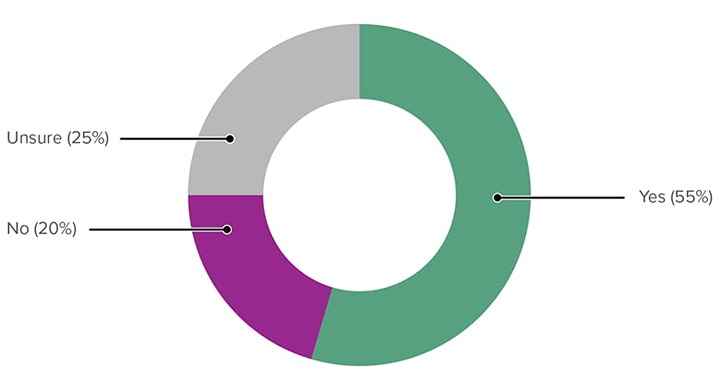
An aging population means an increased demand for accessible services
As people age, they are more likely to experience access barriers New Zealand has an aging population, and there will soon be a larger percentage of people demanding accessible services. A government leader indicated that this may be a useful political angle to use to encourage improving the accessibility of services across government.
We know that as we age we are more likely to be disabled, whether we identify as such or not. We know we have an aging population. [The] number of people who would be helped is growing — [it would be] quite a good political thing in terms of increasing demand for accessible services.
Despite the perception that making services accessible is an additional cost, improving accessibility can be one of the best ways to cut costs and improve economic outcomes
A government leader shared that compliance with the accessibility standard is often seen as an additional cost, but improving access to content and allowing people to complete tasks unassisted can reduce the costs required to provide support.
In the current economic environment, the best way to cut costs is to make things accessible — allow self help. If people ring, [there’s a] cost to serve. The more people who can find what they need quickly, the less phone calls and emails you’re going to get.
Additionally, the impact of disabled people wasting their time trying to engage with inaccessible services or access information, means that they have less time available for other life activities or other societal/economic contributions.
Imagine if you lived in a world in which everything takes longer. If it takes you 15 minutes longer to find a form when other people take 2 minutes. Takes away time from [other life activities]. [The] cost of people not being able to engage with info they need contributes to economic outcomes
Disabled people also shared a similar sentiment — improving accessibility leads to more disabled people being able to contribute to society more easily, can increase productivity, and help ease skill shortages.
[The] New Zealand Government talks about productivity, but we can only be productive if the access needs are met for all disabled people — and then we can all be contributing to society and making it productive, and being taxpayers, and being contributing citizens. So, if we get the access needs right, we get the productivity right.
Over the last few years, I've been involved in several IT-related workforce committees looking at how they can address the shortage of people in New Zealand who are skilled in the digital world. And the reality here is that as well as having barriers to employing women the IT sector also has a perceived barrier to employing disabled people.
DPO representative
A duty to provide equal access to all people
Government practitioners were motivated by a belief that government has a responsibility to ensure that no citizens are excluded from democratic participation, essential services or information. Their desire to build accessible digital services stems from a commitment to equity and human rights, recognising that as government services become increasingly digital-first, they have to work to prevent barriers that might deny people access. They saw accessibility not just as compliance but as an essential to fulfilling the government (or their agency’s) duty to serve people equally.
Government leaders also acknowledged that they know that improving accessibility is the right thing to do, and that should be a primary motivation for making digital government services accessible.
Equity, so that everyone can start from the same knowledge base, and everyone can access services on a level playing field.
So everyone can access them and achieve their goals without significant disruption to their lives.
As more core services move to be digital first or digital only, accessibility is critical so that everyone can access what they need and have agency to participate.
It is important to build accessible services as it creates a better standard of life, equal opportunity and ease of access for everyone.
It’s the right thing to do — I kind of assume that’s a given.
While I think we are not very mature in our accessibility knowledge or processes, everyone I have worked with has believed that following accessibility guidance is the correct thing to do. I've had no push back on including accessibility in product development, and have had people managers who, in spite of having little technical knowledge about digital accessibility, act wholeheartedly as champions and are open to developing their teams in the area. I think that is great.
Disabled participants agree that the government has a duty to provide accessible services, and to not do so is indirect discrimination as access to government services and information is a right.
In terms of the legislation … if you think that actually, lack of accessibility means indirect discrimination. Because what discrimination is, is when you treat people differently based on their personal characteristics, so when you don't provide accessibility, you are actually treating someone who has an impairment differently … I think that's a really important concept that a lack of accessibility means indirect discrimination.
If you invest in accessibility, it should be seen as an investment and not a cost. So that also requires a change in narrative … what we're seeing is, the government kind of ‘doing us a favour’? And it's not. It's a right.
Additionally, disabled participants shared that trying to reduce adherence to the accessibility standard in order to stay within budgets is offensive, as it means choosing who can be left behind.
I think what we hear here is that no one can be left behind. We all have access needs and layers of identities — not because you have some kind of impairment. I tautoko that the question around the budget is offensive — ‘Who do you leave to die?’ — we know historically it’s disabled people.
Reputation management and organisational pride
Agency leaders may be motivated to prioritise accessibility compliance because they want their teams and agencies to be recognised for excellence, rather than criticised for creating barriers that exclude citizens from government services. To avoid this negative publicity, they may choose to provide more budget and support to raise their agency’s profile.
[Chief executives] hate being at the bottom of the table, but ensure help and support is provided to help them raise themselves up the table.
Improving access for all benefits everyone
Government practitioners and disabled research participants both shared that accessible solutions and options usually provide great solutions for different types of disabled and non-disabled people. Some technology features, often initially designed to assist with specific disability needs, frequently become mainstream and beneficial to a wider audience.
Collective decisions we come up with can impact more than just the blind/low vision community.
My kids are interesting — [they] will have captions on when it's hard to hear. Why would we not? It's not only for people who can't hear.
2.3.3.2 Enablers for success
Enable better access to existing research and support conducting new research
Government practitioners shared a strong desire for more primary research and user testing with the disability community in New Zealand, including better access to existing research and support for conducting new quantitative research.
One government leader suggested that DIA could be responsible for organising user groups or panels to help advise on service improvements and validate concepts. They believe that successful organisations have bureaucratic barriers removed and are able to talk to people directly, which in turn builds trust, awareness and confidence.
Some government practitioners also shared a desire for establishing a centralised approach for receiving feedback from disabled people on the usability of services. Other participants suggested creating a panel coordinated by DIA, that might meet regularly to identify common issues and facilitate conversations about problems and good practices.
Can we centralise, make a consistent end user group — it would be helpful for everyone. Someone was saying that if when developing they had engaged earlier, and we had that group, they could have saved thousands.
Use real-life stories and experiences to build empathy with decision makers, practitioners and suppliers
Government practitioners identified that directly involving teams in research and usability testing with disabled people is a powerful motivator. Participants highlighted that watching someone try to use a product creates a strong sense of urgency to fix issues, but noted this must be done in a conscientious way that respects and includes the participant.
Being able to say ‘I'm not making this up! Here is an actual disabled person, and here is what they [experience]!’
Disabled people also emphasised the importance of genuine consultation and understanding their perspectives.
Listen to what the disability community is saying about what issues are important.
Let them know what their abilities are, and the way of them understanding things, and which ways work best for them.
The government could consult with [our organisation] and have workshops about all the websites, and ask what [our organisation]'s opinions are about this one and that one.
Participants also noted the effectiveness of making accessibility personal to help people understand the broader relevance, with one approach being to reference people in their family or putting people in their shoes.
… we're all going to get older one day, some sooner than others.
Suppliers would also find it helpful to have examples of the most common challenges that disabled people experience. This would help put the standards into a real-world context.
It would be more impactful to be able to connect the experience with real people so any connection via research and testing would help practitioners understand the accessibility challenges that people face.
The more it’s not hypothetical, the more it’s rooted in people’s real lives, the better we will do.
It would change how you would write the response in the RFP.
Having a Low vision staff member helped the team understand the real life impact of using the product.
We will learn through understanding lived experience and being able to use that to improve and inform
Embedding accessibility into organisational processes
Government practitioners found that integrating accessibility into the full lifecycle of a project is proving effective. This includes designing and developing products to be accessible from the start, using accessible-by-default technology, and engaging accessibility expertise from the requirements-gathering stage.
We work with government organisations, and I'd say the ones we see doing well are those who have already incorporated accessibility into their mainstream work practices. If we think about digital accessibility from the beginning, it’s not a problem. Every organisation that has an accessibility team, or person — that works well. They are then able to evangelise across the organisation.
Government practitioners also shared that having a clear process for accessibility, and integrating it into the delivering accessible services. Combined with available resources, guidelines, and standards from Digital.govt.nz, this step helps to address accessibility barriers that are otherwise likely to slip through.
Allocate dedicated funding and resources for accessibility
Government practitioners noted that to make progress, there needs to be dedicated budget allocated for improving accessibility. This includes providing more funding for development teams to focus specifically on accessibility work.
Employ more disabled people and build diverse teams
Participants identified that employing more disabled people and building more diverse teams can be a strong internal motivator. When accessibility is a daily reality for colleagues, it encourages everyone to adopt inclusive practices and helps the entire organisation benefit from accessible tools and processes.
One participant also noted the effectiveness of dedicated accessibility testing teams:
The last couple of companies I've presented to in Australia have set up a dedicated accessibility testing team [and] employed disabled staff. Best bet is to hire people who [can use] all the shortcuts and ways of using a screen reader. Every few months I don't do testing I have to go back and remember how to do it. Having dedicated testing teams is great.
Make accessibility knowledge a requirement in relevant roles, supported by training opportunities
Participants suggested that including accessibility skills and awareness in job descriptions for relevant roles would help build capability across government. It was also suggested that basic accessibility training should be required for anyone involved in creating digital products. This baseline knowledge could assist with all content being created as accessibly as possible from the beginning, rather than requiring rework later.
Disabled people also emphasised the need for systematic training.
There needs to be champions in every organisation, but there also needs to be some proper training. No matter which agency you move to, you'll have to make accessible docs, so having that as part of someone's induction — if you're in the comms team, producing internal or external docs, you should be able to make accessible docs. The only way is that if it's led from the top, staff are given opportunities for training. It should be seen as a performance measure.
There’s no reason the government couldn't set up their own systems, and do their own internal training.
Practitioner participants identified that more accessibility training is needed, including introductory sessions for all staff, specialised training for technical teams, and access to training and education available for suppliers.
Participants also shared that even though training might be available, there is a need for management support to ensure there is time given to complete this training.
We started using LinkedIn Learning, which has more free courses, but no one used it. No one uses them because they don't have time, don't have time because it's not built in.
Even though it’s in their job description, we need for management and HR to ensure that training is ongoing, and built into people's day-to-day workload. [It needs to be] built into sprints, and a realisation that you need to be able to upskill, or you won't learn how to make things better.
Some participants also suggested advocating for accessibility to be included in tertiary education courses due to a lack of skills in accessibility of new graduates entering the job market.
...advocate for more accessibility awareness and training in tertiary education — we see a lot of graduates entering the job market without awareness or skills in accessibility.
Embed accessibility standard compliance in procurement processes, and ensure it is adhered to by suppliers and agency representatives
Government practitioners identified that mandating accessibility requirements within procurement processes for the delivery of products and services is an effective strategy for ensuring better outcomes.
Government leaders also emphasised the importance of building accessibility in from the start of procurement. This may involve requiring products to have the full suite of accessibility features and adherence to standards included in the initial procurement rather than it being an add-on to purchase later.
Put in accessibility at the onset and have it tested by disabled people at the procurement stage.
The assumption that accessibility is an “add on” is the problem. If it’s built in from the beginning, it shouldn't be in the “nice to haves”. Budget is not a problem if you assume your site is accessible from the outset.
Participants shared that working with suppliers presents some challenges, and that they would benefit from being able to require suppliers (through the procurement process) to involve disabled people rather than just ticking accessibility as ‘Done’.
Government leaders also noted concerns about current supplier vetting, sharing that suppliers do not have to prove their accessibility capabilities and often fall short of expectations.
There needs to be more vetting about Marketplace. People can [currently] just apply. Vendors should prove they can do what they say they can do. Vendors need to be honest about what they can and can't do ... [they should know] that [accessibility] isn't just a ‘nice-to-have’. If [vendors] have a roadmap, that is good. It gives them the impetus to move ahead. They get work and we get a more accessible product and process.
Practitioners shared that maintaining strong, ongoing relationships with suppliers is a positive factor that has helped in the delivery of accessible digital services.
Provide templated contracts and master service agreements
Participants shared that centrally provided resources, such as templated contracts or master services agreements from a lead agency like DIA, could help organisations consistently uphold their accessibility responsibilities when working with suppliers.
Suppliers are also looking for some leadership within the government to ensure that all government agencies comply with these standards and systems. This would provide consistency for the public, and save budget overall by avoiding duplication of effort.
This would support suppliers in the way they communicate with their clients, to inform the appropriate and best practice approach for projects.
I see stuff that other [suppliers] release, and I'm like, ‘but that's not usable’.
Different agencies are spending their money on their ecosystem individually and it's a big waste of taxpayer money.
If someone really high up mandated that [everyone used the same design system], I think that would be good, so everyone just had to do it. There would be no interagency grumbling, or my-turf-wars bullshit happening. Just make it better for all users, please.
Start small and iterate to build momentum
One government leader suggested an incremental approach to improving accessibility of services would be a good place to start to act on resolving issues and build momentum and confidence of both the disabled community and practitioners working in government.
What are the [top] 10 things that people with disabilities need to do when interacting with government agencies? [I’d] suggest asking disabled people what those top 10 things are, and asking agencies what they think the top things are. Then suggest deciding on three and doing those first, and then building the next service. This will show that there is the general desire to simplify and remove barriers, and will win the confidence of disabled people — ask them what are the top things that will help them.
Provide access to accessibility specialists
Government practitioners found that having access to internal specialist accessibility teams, advisors, and external consultants is highly effective, with participants also noting that external consultants provide significant value when brought in during early project stages.
There is a need for more dedicated accessibility champions and specialists, either through additional roles within agencies or by growing a central pool of experts who can advise and support across government.
[I would love] access to an AoG design practice. Our organisation is too small to have these practices, but we need to use them occasionally. This is a common problem for smaller agencies including councils.
Government practitioners shared that the Web Standards team at the Department of Internal Affairs provides particularly beneficial support through "web standards clinics" that are useful for discussing issues and sharing information.
Disabled people also emphasised the need for dedicated roles within departments, to relieve the burden on support organisations.
Each department should have a Deaf and Disability inclusion specialist as a hired role but instead they exclude by design. They are doing this by placing the 'burden' back on the support organisations and then limiting their funding to do so by cutting funds.
Some participants suggested that a shared pool of accessibility experts that could be used across government agencies would be beneficial, though they acknowledged the logistics of a booking system would be tricky and involve significant planning ahead.
Formal training and upskilling opportunities
Government practitioners found that the availability of formal training, such as workshops and clinics run by the Department of Internal Affairs and within individual agencies, is helping to upskill practitioners who are involved in delivering digital services.
Participants also noted that pairing experienced staff with less experienced staff is an effective way to build capability, as when experienced practitioners work directly with less experienced team members, they can effectively upskill them and improve the accessibility of internally built products over time.
Communities of practice enable knowledge sharing
Communities of practice and internal employee networks are highly valued as forums where practitioners can share ideas, ask for guidance, and learn from their peers across government. Participants noted that community of practice groups are good, with the accessibility community of practice being particularly great for sharing problems and solutions.
The Accessibility Community of Practice is great, sharing problems and solutions is helpful.
Increase, formalise and reward collaboration across agencies
Participants suggested that more inter-agency collaboration would help agencies solve common problems together. This could be enabled by formalising how subject matter experts contribute their time to system-wide solutions and expanding existing communities of practice.
They highlighted that a significant barrier to creating system-wide solutions is that agencies are often not encouraged or rewarded for contributing expertise outside of their own organisation.
More structured and even mandated opportunities for cross-agency collaboration are needed. This could involve co-locating teams or creating joint roadmaps to develop more citizen-centric services and break down agency silos.
A formal framework, potentially led by the Government Chief Digital Officer (GCDO), could mandate that agencies contribute a proportionate amount of time and expertise to these shared initiatives.
The impact of internal advocacy and education
Participants identified that passionate accessibility champions play a key role in educating colleagues and suppliers on the importance of accessibility. This internal advocacy and knowledge sharing helps to build capability within teams and across wider organisations. As one government practitioner reflected:
People like us, and forums like this fighting the good fight — it all helps.
Gaining buy-in from senior leadership
Participants identified that support from senior leadership is a key motivator for organisational change. When chief executives and other leaders act as champions and understand the benefits of accessibility and good service design, it provides a top-down mandate for teams to prioritise this work.
[It] all comes back to change of mindset — mindfully doing it and making that change. Not good enough saying 'Not my circus, not my monkey'. If you give people a solution that isn't theirs, they won't run with it. It’s about helping people work out their own solution, so it is their monkey, it is their circus, so they do want to do something about it.
Participants noted examples of leadership accountability, such as in the UK where they make sure the minister is able to use a digital service before they release it, and emphasised that there's a professional responsibility of those working in the public service to make sure that all government services can be used by everyone.
Where an agency or department or organisation has buy-in from the top, that accessibility is a priority that we don't compromise. That’s where we get really good buy-in and progress.
Disabled people also emphasised the critical role of leadership understanding accessibility, ensuring that it flows through to end service delivery and that there is accountability built into the culture.
If the leadership team don't get it, don't demonstrate that they get it, how do you expect the staff below them to do better? [It’s] about the culture in an organisation.
We're dealing with people at the second level of management [one down from Chief Executive] — they don't have a clue. As soon as they produce something you realise. Hold the Chief Executive accountable, make sure the culture and expectations are flowing through.
Participants commented that when a central agency like DIA sets clear standards, it creates a necessary push at the executive level, ensuring that compliance becomes a strategic priority for leadership. This top-down direction empowers digital teams, shifting their role from having to advocate for change from the ground up to being enablers who can deliver on centrally agreed priorities.
Provide targeted accessibility training for senior leaders
Government practitioners suggested that holding targeted workshops for the top tiers of management across government would help provide them with clear arguments for the importance of accessibility. This would help to secure genuine buy-in and support from leadership teams.
Participants noted that a successful approach is to specifically target the top three levels of management, and that this could be scaled across the public sector at a senior leadership level.
Create resources that build empathy and understanding with leaders
Participants suggested that developing communications materials such as case studies, user personas, and customer journey maps based on research would help build empathy and understanding of accessibility challenges among decision makers. They shared that this is most effective when the materials are "wrapped" in robust user research, using large data sets to create powerful and relatable stories that make the challenges feel personal to leaders.
Linking accessibility to tangible business benefits and providing dedicated funding
Government practitioners noted that framing accessibility in terms of business or financial outcomes can be a motivator for some organisations. For example, organisations may be motivated by the potential loss of revenue when an inaccessible website prevents people from being able to pay for a service. Making dedicated funding available removes cost as a barrier to improving accessibility, with financial incentives such as budget contributions or rebates for procuring accessible solutions making it easier for organisations to comply.
To secure leadership buy-in, practitioners identified a need to become more adept at 'speaking business'. This involves translating the value of good design into tangible business outcomes, such as increased efficiency and cost reduction, as simply advocating for user needs is often not enough.
Establishing formal accountability structures and maturity measures
Participants suggested implementing formal structures to maintain connection with AoG initiatives.
One government practitioner proposed:
With the Plain Language Act — each agency was to appoint a plain language officer. Maybe appoint an accessibility officer to be in touch with DIA about what's happening with the standard. Ideally someone at a senior level, so they have responsibility in following up, reporting back to leadership.
Some also suggested implementing a Digital Accessibility Maturity Model that would involve speaking to many people and looking at everything within an organisation. This might look like providing tiering assessments for agencies; from knowing about accessibility as a low level assessment, to employing people for audits as a second level, to programmes of work building accessibility into procurement policies at a third level, to having total buy-in from leaders and separate accessibility offices to conduct audits and ensure policies are in place at the highest level of maturity.
Centralised accessibility auditing system, supporting information and guidance
Government practitioners expressed enthusiasm for a central audit system with supporting resources, potentially through partnership between Whaikaha and DIA to co-sponsor auditing other agencies. Participants also shared that the results should be published, but that there should be accompanying resources provided to help agencies learn from and address issues found through these audit systems.
Participants noted that CWAC (Centralised Web Accessibility Checker) is working well, focusing on accessibility that can be done automatically for approximately one-third of issues.
CWAC and leaderboards are good for issues that can be automatically detected, and prioritised quickly.
The good thing about CWAC — we publicised it widely, business owners are quite interested. They wanted a leaderboard about which agency was the best and worst, to make sure it wasn't them that was the worst.
However, participants acknowledged the need to understand barriers agencies have to addressing issues found in these audits and provide support, as agencies often do not follow through on results found.
… why do people not follow through on an audit? What do you put in place to make it easy to respond to an audit? I don't think we'd want to intervene until people had been through that process … [it’s] not just the outcomes of the CWAC work, if there are ways we can guide about raising the profile of the work, and continuing the conversation.
Create a new central “front door” for disabled people, which prioritises accessibility and alternate formats for all services
Participants suggested creating a dedicated, centralised website specifically designed for disabled people that would serve as a unified entry point to all government services and information. This 'front door' would prioritise accessibility from the ground up, ensuring that disabled people can easily navigate and access essential government services without having to navigate multiple agency websites that may have varying levels of accessibility. It could also provide a central location for the full suite of alternate formats for essential services and information.
GCDO to endorse specific tools and technology
Participants suggested that leadership-driven, cross-government initiatives are seen as effective, including centrally coordinated co-funding opportunities for accessibility tools that multiple agencies can use when building and testing products and services. They noted the growing availability of mature and effective automated accessibility testing tools is helping to improve services.
Participants also suggested that exploring options for AoG use of AI tools could be a promising way to aid accessibility, including using tools for functions like reading text aloud from documents or producing alternate formats quickly.
With our AI tool, we spent a day and half feeding it and got a list of requirements. If DIA had this as a resource government and private companies could use it [as a resource].
Develop and maintain a shared New Zealand Government Design System
The creation of a New Zealand Government Design System or template design system was suggested as a way to help agencies build accessible services more consistently and efficiently, including working with suppliers.
We spend so much money with vendors trying to come up with fancy new designs — people don't come to a government website to have a good time, they just want to get on with their life. They don't care which website it’s on, or don't even know which website they're on.
[It’s] challenging keeping vendors up to our standards. Also we have a couple of dozen brands to uphold.
Providing an updated New Zealand Government Design System containing practical examples of components, code and how that solution is presented would help practitioners understand what real world accessibility means in practice. Having access to a suite of accessible examples would support practitioners when advocating to their clients about accessibility. In particular, giving practical detail about code and ARIA tags would be very valuable.
Participants noted examples from other countries where all government websites had the same look and feel, and expressed a desire for a design system with more flexible options and expanded design system components.
Participants also mentioned that they would like to build upon the New Zealand Government Design System (alpha phase) that has already been created, however there was some disagreement on if all sites should have the same appearance or allow for customisation. Having a AoG system that provides consistency across all government agencies while providing a little more flexibility than the UK design system would allow for the integration of brand differences where needed.
When they were doing the Govt.nz website, running on the UK example — all government websites had the same look and feel. I think that would be great.
I’ve used the AoG design system in the past and would like to see it expanded to include other components. For example, I have used accordions, but would also like to use things like a ‘back to top button’. Would not want to be forced to look like AoG look though.
Practitioners also shared that a design system would provide an opportunity to remove barriers and provide consistency when implementing accessible features.
This is important as developers have different ways of doing things, we are educating them. They all claim they're up with accessibility, but there's a range of ideas & whether something is a fail or not
They also shared that all agencies could contribute into a central platform to create shared components for use across all government sites.
We need a shared development fund reinstated — all government agencies paying into the central platform to create a module — for example a shopping cart — that all agencies can use, and that is accessible and usable."
Disabled people also expressed a desire for consistent appearance of government services.
Sometimes I think what happens is, everyone has their marketing team, everyone wants to look good for the internet, but I think we should just have one way, and one way only.
If there was a style guide across government everyone could reference that [and create consistency].
Same with a website — so many agencies don't have style guides, of if they do, staff don't know they exist or how to use them.
Providing a New Zealand Government Design System that is highly accessible, highly usable, with good content guidelines, patterns, and usability approaches will mean that the New Zealand public could have a consistent experience across all government websites.
Provide clear and easy-to-understand standards, guidelines, and resources
Government practitioners noted that the existence of the New Zealand Government Web Standards, along with resources and guidance available on Digital.govt.nz, provides a crucial foundation. These resources, along with internal design systems and templates, are used to support and advocate for accessible practices with decision makers.
Government practitioners identified that organisations are more motivated to meet these standards when they have access to clear information and training that explains what is required and how to achieve it.
Make it easy as possible to do the right thing.
Participants noted that central guidance is often too high-level. It forces individual agencies to create their own practical resources for specific tasks like making Word documents or emails accessible and leads to duplication of effort across government. There is a need for more online guidance that is easy to understand, with practical, low-level examples and templates that can be applied by all staff.
Why can't GCDO provide a standard template for how best to do a Digital Services unit regardless of cost? Could even be organised not around roles, but skills sets, therefor being able to scale the template up or down by moving skillsets apart or combining them. Having that kind of template, just like the digital service guidance, gives clear exact guidance that every org could look at, and then know what works and potentially aim for.
There is a strong desire for more tangible, real-world examples of the standards being successfully applied, with participants expressing a desire to be shown what good looks like rather than having to interpret abstract principles.
These examples should extend beyond just visual design and components, to also include guidance on how to operationalise the standards, including best-practice team structures and resourcing models.
Suppliers also shared that the current standards and WCAG are difficult to understand, and challenging for some suppliers to know if they have met usability and accessibility standards. Providing a plain language interpretation of WCAG and how to meet the standards would give better clarity and direction for suppliers. Embedding this interpretation into the procurement process would also help ensure suppliers know how to test and measure the services they are delivering.
Make the standards really simple, really clear.
Defining the word, you must ‘meet’. What is the goal you must meet? The ‘standards’ — what do you mean?
One of the most useful things that WCAG produce isn't in the standards. You have to go digging for it, and it's where they actually give practical examples of how you can meet the standard.
This is what it means in practice, and these are examples. We can take the examples to clients and say "this is what we’re talking about’
Mandate that all government agencies use the AoG standards and systems to ensure a consistent and accessible experience for all the New Zealanders
Government practitioners and disabled people both made a strong call for greater accountability through enforceable standards, a new accessibility charter, or legislation. It was suggested that there should be clear consequences for non-compliance to provide a "stick" rather than just a "carrot" approach.
A key point raised was that a mandate is ineffective without meaningful consequences for non-compliance, with participants suggesting that consequences similar to those in the US and Australia are needed to ensure that organisations are compelled to act.
Participants noted the importance of refreshing existing commitments:
There was (and is) an accessibility charter, which various agencies signed up to. I believe it was designed with website access in mind, ensuring people's websites were accessible, and materials from government were available in alternate formats. I think it's due a refresh — encouraging other agencies sign up would be helpful.
Signing up to a charter can be seen as extra work unless there's a clear mandate to signify it being a priority.
Whaikaha and DIA should lead the mandate.
A participant from overseas shared their perspective on legislative impact:
Coming from another country with enforceable standards, legislation can really accelerate the change. That will drive changes in universities to form future UX designers. The changes will just come and come. People become more informed because they have better access to info, better economic status. It's a win-win-win.
Disabled people emphasised the importance of sustainable change beyond individual champions:
Champions come and go, but without a mandate, champions can leave and then you're back to square one.
Extend the accessibility mandate to a broader range of organisations
Participants suggested that the mandate for accessibility should be extended to include local government. It was highlighted that local councils are a critical and daily point of interaction for many people seeking information and services, making their exclusion a significant gap. Applying the standards consistently across both central and local government would create a more seamless and equitable public sector.
I sound like a broken record, but it’s really helpful if the mandate to comply with accessibility and web standards in general is extended to local government. A lot of people interact with council on a daily basis to get information and make transactions, but we are not included in the mandate.
Introducing clear consequences for non-compliance with the accessibility standard
There was a strong sentiment that clear consequences for not meeting standards would be a primary motivator. Suggestions included making standards legally enforceable, implementing regular audits and public performance reporting, and introducing sanctions or penalties for non-compliance.
Government practitioners noted the current lack of enforcement:
Having some kind of stick from DIA — ‘your website doesn't meet web standards, you must fix it’. We often get ‘what's the consequence if we don't fix it?’ but there aren't any.
Companies I've worked with in Australia have more of fear of litigation. It started with the Sydney Olympics, [they] got taken to court and lost. [It was] big for the IOC [International Olympic Committee] to lose — it was all over the news. Australia having a litigious system has driven change.
Not so much here, but there are pockets where it's coming along. I don't agree with the suing and litigation approach, but we need to find ways to make organisations and vendors deliver accessibility.
Disabled people’s organisation members also emphasised the need for accountability at leadership level:
Government agencies have signed up to the charter, [but] don't seem to be living it. Until the CEOs are made accountable for what their agency isn't doing, we might see a change. If Health and Safety isn't a requirement (without consequences), then I'm not going to do anything
It's a difficult one — unless there's some reason I have to do this, why am I going to do it? I don't believe people go out of their way to create information that’s not accessible. People just don't have opportunity or the skills to do that.
Require it for a performance review — if there's no incentive, people won't do it.
Public reporting and benchmarking to motivate compliance
Government practitioners suggested that sharing knowledge and performance data between organisations can create positive pressure to improve. It was suggested that seeing how one's own organisation compares to others, and publicly highlighting both good and poor performance, would motivate leaders to invest in accessibility. Using mechanisms like leaderboards, sharing success stories, and highlighting best practice encourages others to improve their own performance.
Create specific incentives for suppliers to encourage compliance
Some participants suggested introducing a system to reward suppliers who demonstrate strong accessibility compliance would motivate the market to improve. This could include a tiered system in the government marketplace or an official compliance "badge" that allows suppliers to signal their expertise, along with ensuring funding and championing to support agencies in delivering on accessibility mandates.
Utility links and page information
Last updated